
Each user of the system can be assigned a level of authority, which authorizes the user for certain system functions. A user can have different levels of authority within different partitions.
Use the “View Capabilities” keypad function (User Code + [✳] + [✳]) to view the partitions and authority levels for which a particular user is authorized. These levels are described below.
Level 0: Installer (User 1) Code
- Programmed in field *00 (default = 4-1-4-0). Installer Open/Close reporting selected in field *39.
- Can perform all system functions (arm, disarm, bypass, etc.), but cannot disarm if armed by another code.
- Can add, delete, or change all other codes, and can select Open/Close reports for any user.
- Is the only code that can be used to enter program mode.
- Must program at least one Master Code during initial installation.
Level 1: Master Codes
- Can perform all normal system functions.
- Can be used to assign up to 148 lower-level codes, which can be used by other users of the system.
- Cannot assign anybody a level of 0 or 1.
- May change own code.
- Can add, delete, or change Manager or Operator Codes.
- Open/Close reporting is automatically the same as that of the Master who is adding the new user.
Level 2: Manager Codes
- Can perform all system functions (arm, disarm, bypass, etc.) programmed by Master.
- May add, delete, or change other users of the system below this level (Cannot assign anybody a level of 0, 1, or 2).
- May change own code.
- Open/Close reporting is automatically the same as that of the Manager who is adding the new user.
Levels 3-5: Operator Codes
Can operate a partition, but cannot add or modify any user code (see table below).
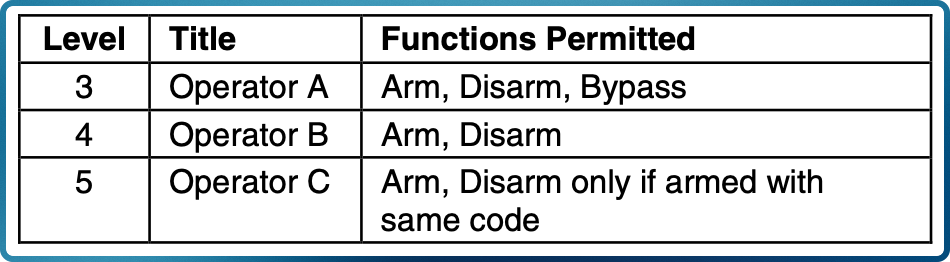
Operator C (sometimes known as the Babysitter Code) cannot disarm the system unless the system was armed with that code. This code is usually assigned to persons who may need to arm and disarm the system at specific times only (e.g., a babysitter needs to control the system only when babysitting).
Level 6: Duress Codes
- Sends a silent alarm to a central monitoring station if the user is being forced to disarm (or arm) the system under threat (system must be connected to a central station).
- Assigned on a partition-by-partition basis, and can be any code or codes desired.
General Rules on Authority Levels and Changes
The following rules apply to users when making modifications within the system based on the user code authority levels:
- Master Codes and all lower-level codes can be used interchangeably when performing system functions within a partition (a system armed with a user’s temporary code can be disarmed with the Master Code or another user’s temporary code), except the Operator Level C Code described above.
- A user may not delete or change the user code of the SAME or HIGHER authority than that which he is assigned.
- A user (levels 0, 1 and 2 only) may only ADD users to a LOWER authority level.
- A user may assign other users access to only those partitions to which he himself has access.
- A user code can be DELETED or CHANGED only from within the partition it was created in.
- User numbers must be entered in 3 digits. Single-digit user numbers must, therefore, always be preceded by a “00” (e.g., 003, 004, 005, etc.). Make sure the end user understands this requirement. Temporary codes are entered as 4-digit numbers.