
Unlike zones and keypads, each of the 128 users can be assigned to multiple partitions (programming question#026). Also, users can be enabled to send Opening/Closing signals to the CS by partition (programming question#027).
Once enabled, the user’s functions (arming, disarming, bypass, etc.) in the partition depends on its AUTHORIZATION LEVEL (programming question #024). Depending on its authorization level some users can define, modify or delete users through the keypad. To prevent users from performing modifications across partitions each of the users contain a MASTER PARTITION value (programming question #028), which means that users with the proper authorization level can modify only those users having the same master partition number.In additition, a feature known as SUPER USER allows all users with an authorization level of 1 to be able to alter user partition assignments within all the partitions of the system (programming question #055). Similarly, all users with an authorization level of 2 are able to alter user partition assignments but only within their own assigned partitions. However, USER #001 is ONLY allowed to have its partition assignment altered by itself.
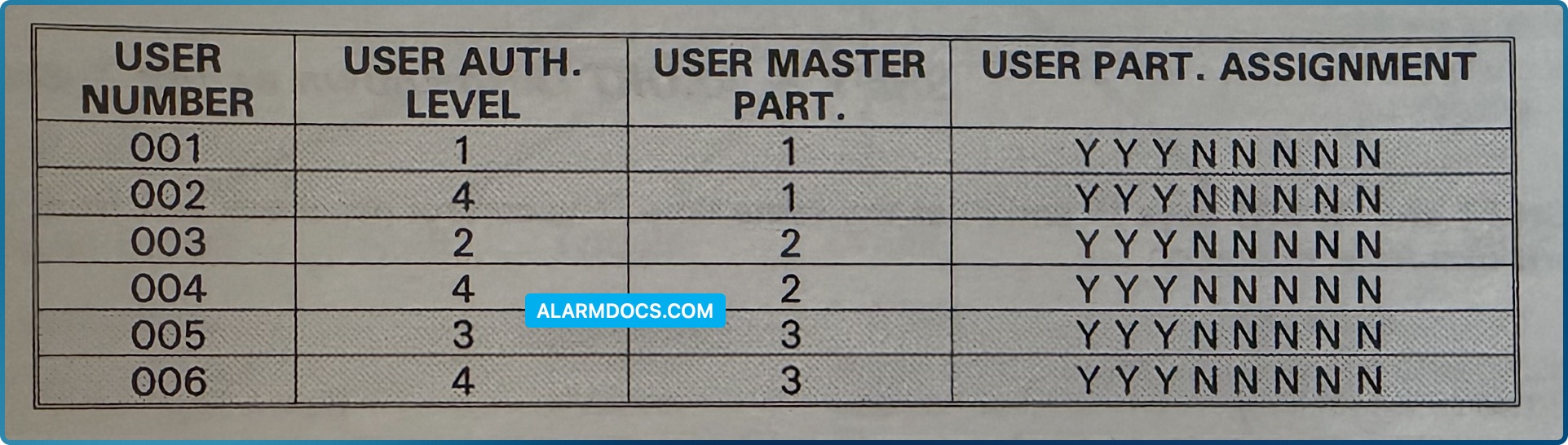
PARTITION #1: USER #001 can modify itself and user #002; USER #003 can modify itself and user #004; USER #005 can modify itself and user #006.
PARTITION #2: USER #001 can modify itself and users #002, #003 and #004; USER #003 can modify itself and user #004; USER #005 can modify itself and users #004 and #006.
PARTITION #3: USER #001 can modify itself and users #002, #005 and #006; USER #003 can modify itself and users #004, #005 and #006; USER #005 can modify itself and user #006.