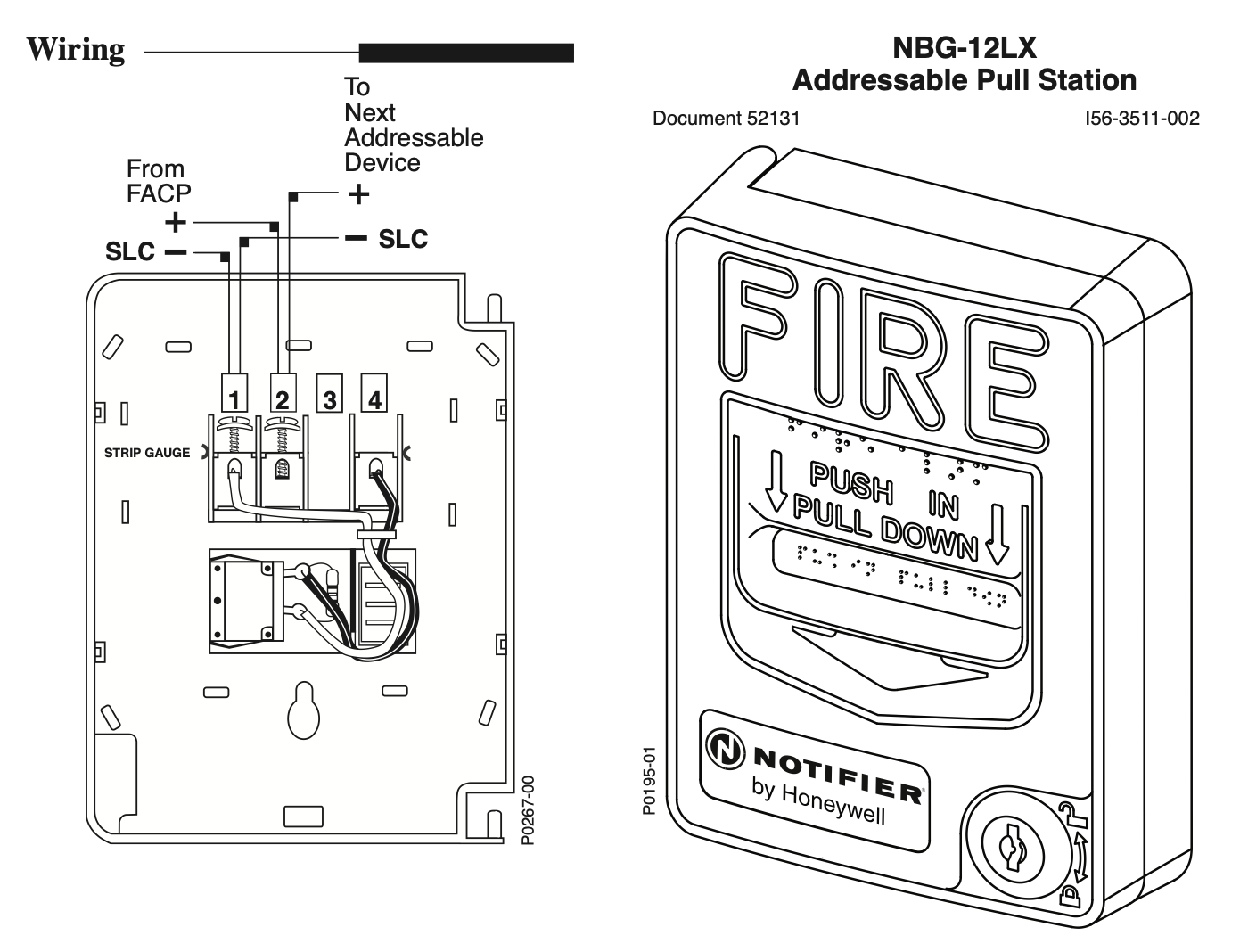
The NBG-12LX Addressable pull station is a non-coded, dual-action manual pull station with a key-lock reset feature. It provides NOTIFIER intelligent fire alarm control panels (FACP) with one addressable alarm initiating input. The addressable module is housed in- side the pull station. The NBG-12LX is compatible with all Notifier intelligent panels and will automatically operate in either FlashScan™ or CLIP (Classic Loop Interface Protocol) mode. FlashScan™ is a patented High Speed Communications Protocol. Refer to the FACP Installation Manual to determine if FlashScan™ protocol is supported.
FlashScan™ or CLIP operating mode must be selected in the FACP. (This selection is not available or required in FACPs that do not support FlashScan™, therefore CLIP mode is enabled by default.) No selection is required in the Pull Station. The NBG-12LX meets the ADAAG controls and operating mechanisms guidelines (section 4.1.3[13]), and the ADA requirement for a 5 lb. maximum pull force to activate the pull station. Operating instructions are molded into the pull station handle along with Braille text. Molded Terminal numbers are also present. Conforms to ANSI/UL Standard 38 and ULC Standard S528.
Ratings
- Normal Operating Voltage: 24 VDC.
- Average Operating Current (LED Flash): 375 µA.
- Maximum Operating Current (LED On): 5 mA.
- Temperature Range: 32° F – 120° F (0° C – 49° C).
- Relative Humidity Range: 10% – 93% non-condensing.
Installation
The NBG-12LX Addressable pull station can be surface mounted to an SB-10 or SB-I/O surface backbox or semi-flush mounted on a standard single-gang, double-gang or 4″ (10.16 cm) square electrical box. The optional BG-TR trim ring can be used if the NBG-12LX is to be semi-flush mounted.
Operation
To activate the dual-action pull station, push in and pull down on the handle. The word ‘ACTIVATED’ appears after the handle is pulled down. This will remain until the pull sta- tion is reset.
The pull station includes one Single Pole, Single Throw (SPST) Normally Open (N/O) switch which closes upon activation of the pull station.
Resetting the Pull Station
- Insert the key into the lock and rotate 1/4 turn counterclockwise.
- Open the door until the handle returns to normal.
- Close and lock the door.
ADA Compliance
For ADA compliance, if the clear floor space only allows forward approach to an object, the maximum forward reach height allowed is 48 inches (121.92 cm). If the clear floor space allows parallel approach by a person in a wheelchair, the maximum side reach allowed is 54 inches (137.16 cm).
Setting the NBG-12LX Address
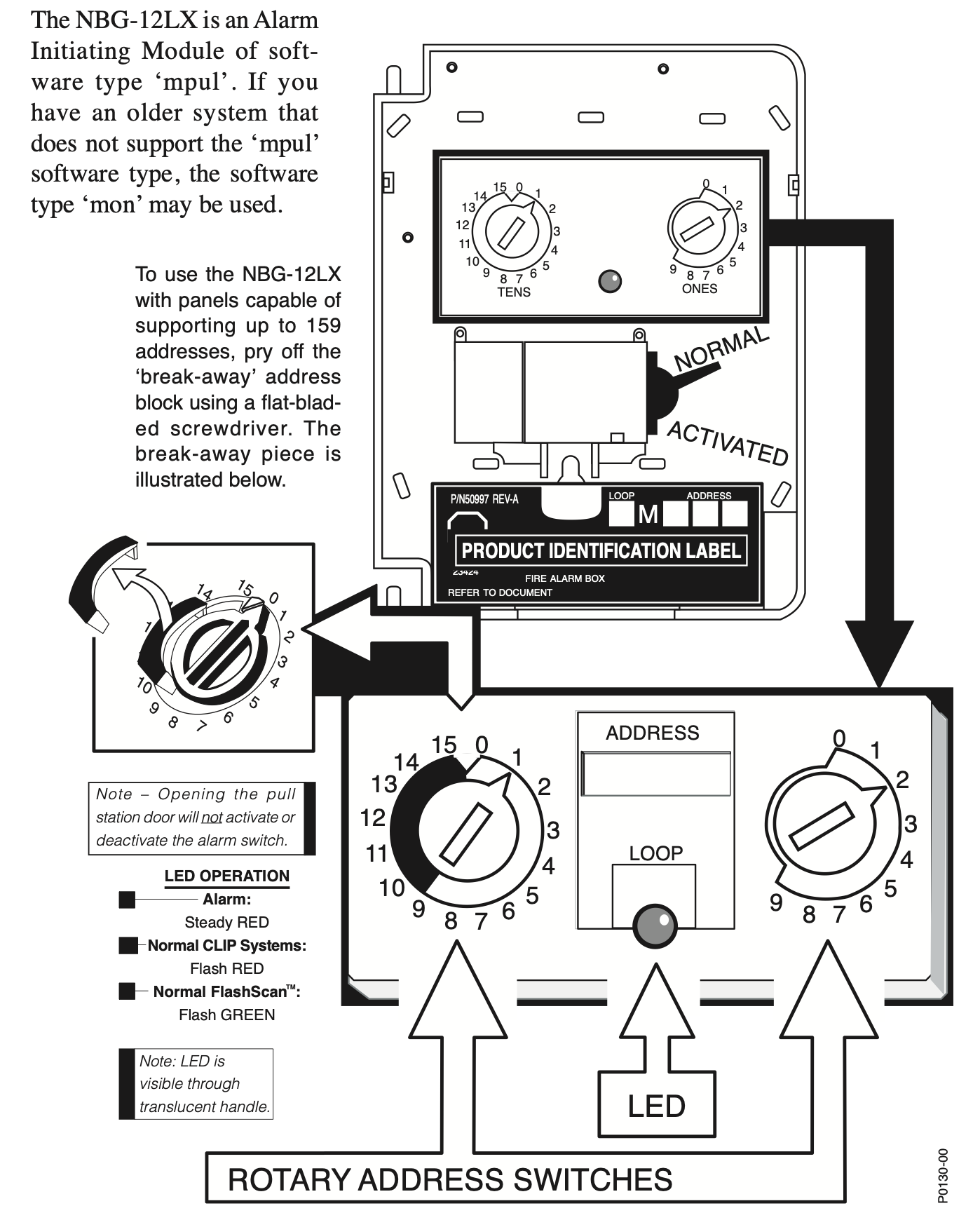
The NBG-12LX Addressable pull station is factory preset with address ‘00.’ Set the address for the pull station by turning the rotary address switches on the addressable module mounted inside the pull station. Only one device per address is allowed. Multiple modules may not be set to the same address on the Signaling Line Circuit. Once the address is set, record it in the space provided on the product ID label located inside the pull station.
Software Note for AM2020/AFP1010 Programming