
The 1136 Wireless Remote Chime is a multi-function sounder that plugs directly into a standard 110 VAC wall outlet.
The 1136 provides extra annunciation in installations that benefit from a louder keypad chime, or small applications where no keypad is installed and the system is controlled from an app.
The 1136 annunciates Chimes (Zone Monitor), as well as Entry Delay, Exit Delay and Alarm messages.
Program the panel
The 1136 is programmed in the panel as a wireless output. Refer to the panel programming guide as needed.
If a wireless keypad is used, the 1136 will follow the first wireless keypad that was added and sound with the keypad. If a hardwired keypad is used, the 1136 will follow the first hardwired device on the system and sound with the keypad.
For panels with Version 171 firmware or below, there must be a wireless keypad installed on-site and programmed into the system for the 1136 to sound with the keypad.
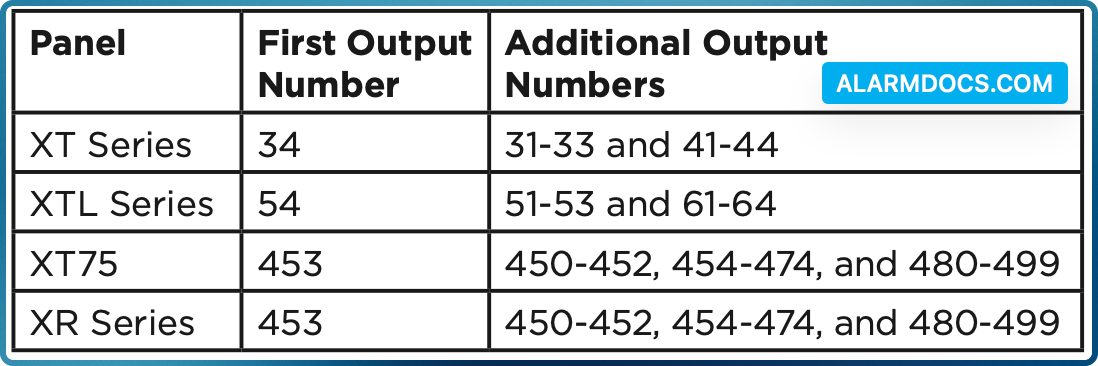
- In OUTPUT INFO (XR Series and XT75 Control Panels) or OUTPUT SETUP (XTL Series and XT30/XT50 Control Panels), enter the OUTPUT number. For the first 1136 added to a system, use the following output numbers:
- Enter the OUTPUT NAME.
- Enter the eight-digit SERIAL# and press CMD.
- Enter the SUPRVSN TIME (Supervision Time) and press CMD.
- Select NO when TRIP WITH PANEL BELL displays. Selecting
- NO will allow the device to listen for keypad messages to sound instead of bell options.
- Press the back arrow when OUTPUT SETUP displays.
- For XR systems that need to send trouble notifications about the Chime, see Additional Programming below.
- Press CMD until STOP displays and then press any top row select key or area to save and exit programming.
Select a location
The 1100 Wireless Series provides a Survey LED capability on most transmitters to allow one person to confirm communication with the wireless receiver or panel while the cover is removed.
This device does not have the Survey LED functionality so use either an 1101 Universal Transmitter or 1106 Universal Transmitter to perform the following test to select a good location for the 1136.
- With the cover removed, hold the transmitter in the exact desired location.
- Press the tamper switch to send data to the panel and determine if communication is confirmed or faulty.
Plug in the 1136
Use an outlet where the 1136 has good communication to the panel based on the results of the LED survey.
Test the 1136
After the 1136 has been programmed and plugged in to an outlet, test the 1136 to confirm that it is communicating clearly with the panel. Follow these steps to perform a Wireless Check-in Test from a keypad connected to the system:
- At the keypad, enter 8144 (WALK) and select WLS.
- If the 1136 fails to check in at the keypad, relocate it to a different outlet.
Additional Programming
When using an XR Series, to receive notifications that there is a trouble on the 1136, go to the AUX 1 ZONES in Status List and enter in which keypad addresses you would like to receive notifications.