The 1100DH Series Wireless Receiver provides up to 32 wireless zones for XT30/XT50 Series panels. The 1100DHE features 128-bit AES encryption.
The 1100DH Series provides two-way, supervised communication using 900 MHz frequency hopping spread spectrum technology.
The 1100DH contains additional transmit and receive amplifiers to enable greater distances for 1100 Series operation for harsh building environments.
The system is designed so only one 1100DH is used per panel.
Compatibility
- XT30 Series panels
- XT50 Series panels running firmware Version 102 or higher
- Encryption requires panel Version 183 or higher
- 1100T Translator requires receiver firmware Version 207/301 and higher
PROGRAM THE PANEL
- Reset the panel.
- At a keypad, enter 6653 (PROG) to access the PROGRAMMER menu.
- In SYSTEM OPTIONS, program a HOUSE CODE between 1 and 50. See House Code Explained for more information.
- If you are programming an XT50 Series panel, select NO at the BUILT IN 1100 WIRELESS prompt to allow the panel to use the 1100DH for wireless communication.
- (1100DHE only) At the 1100 ENCRYPTION prompt, select ALL to only add encrypted wireless devices to the system. Select BOTH to allow both encyrpted and non-encrypted wireless devices to be programmed.
- (1100DHE only) The default passphrase appears at the ENTER PASSPHRASE prompt. Press CMD to keep the default. Press any select key or area to change the passphrase and enter an 8‑character hexidecimal string (0‑9, A‑F).
- Press CMD until STOP displays and pre
SELECT A LOCATION
The receiver should be centrally located between the DMP panel and the 1100 Series transmitters used in the installation based on the wiring specifications below. Use an 1106 Series Universal Wireless Transmitter to perform an LED survey.
- With the cover removed, hold the transmitter in the desired location.
- Press the tamper switch to send data to the panel and determine if communication is confirmed or faulty.
WIRE AND MOUNT THE RECEIVER
The panel immediately recognizes the 1100DH if the panel is programmed with a house code. Do not use shielded wire between the panel and receiver.
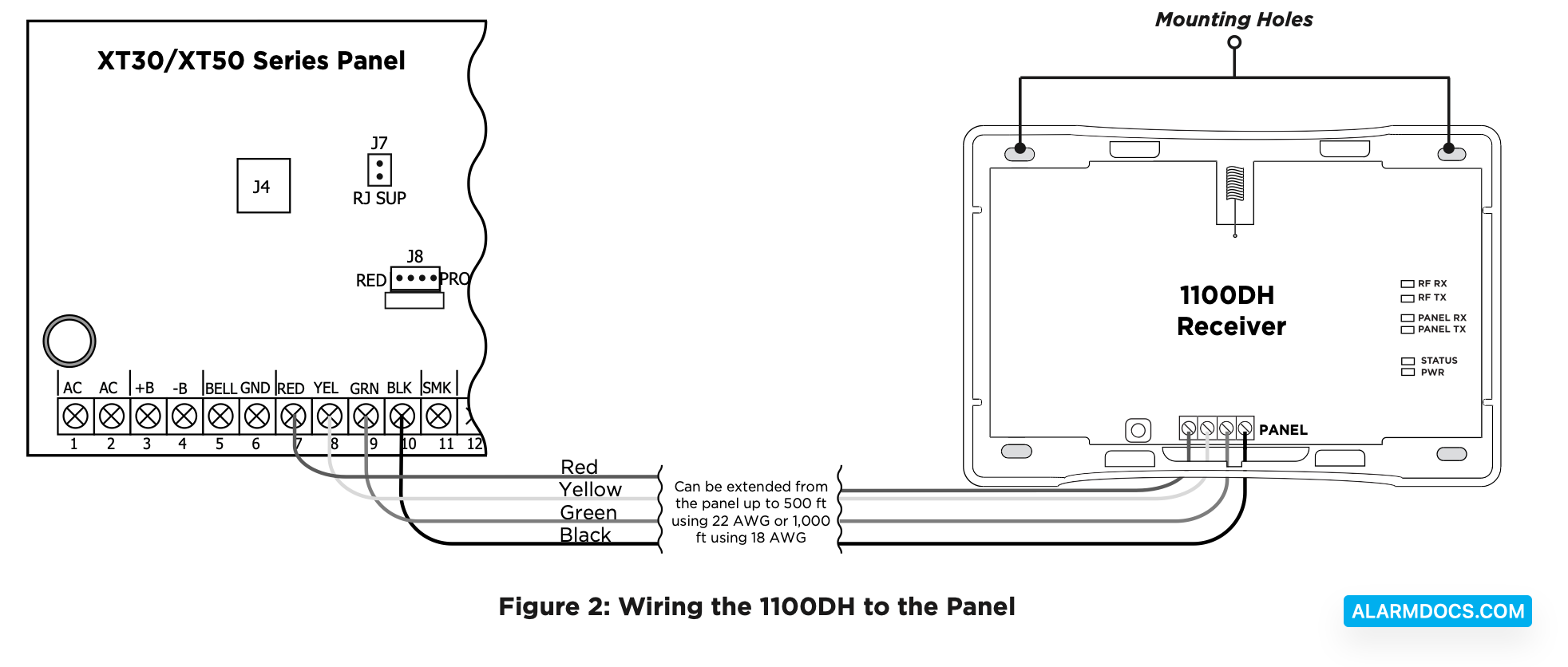
- Connect the red, yellow, green, and black wires to the PANEL terminal on the 1100DH.
- Connect the other end of the wires to the terminals 7, 8, 9, and 10 on the panel. See Figure 2
- Use the included #6 screws to secure the 1100DH to the wall. See Figure 2 for mounting hole locations.
- Snap the cover back on to the base.
ADDITIONAL INFORMATION
Wiring Specifications for Keypad Bus
- DMP recommends using 18 or 22-gauge unshielded wire for all keypad and LX-Bus circuits. Do Not use twisted pair or shielded wire for LX-Bus and Keypad Bus data circuits. To maintain auxiliary power integrity when using 22-gauge wire do not exceed 500 feet. When using 18-gauge wire do not exceed 1,000 feet. Install an additional power supply to increase the wire length or add devices.
- Maximum distance for any one circuit (length of wire) is 2,500 feet regardless of the wire gauge. This distance can be in the form of one long wire run or multiple branches with all wiring totaling no more than 2,500 feet. As wire distance from the panel increases, DC voltage on the wire decreases.
- Maximum number of devices per 2,500 feet circuit is 40.
- Maximum voltage drop between the panel (or auxiliary power supply) and any device is 2.0VDC. If the voltage at any device is less than the required level, add an auxiliary power supply at the end of the circuit. When voltage is too low, the devices cannot operate properly.
Programming Zones
When any wireless input zone for a particular address is programmed, the 1100DH responds to the panel for this address. Other devices, such as keypads or hardwired zone expanders, cannot use this address. Zones connected directly to the panel cannot be wireless. See Table 1 for designated zone numbers.

1100DH LED Operation
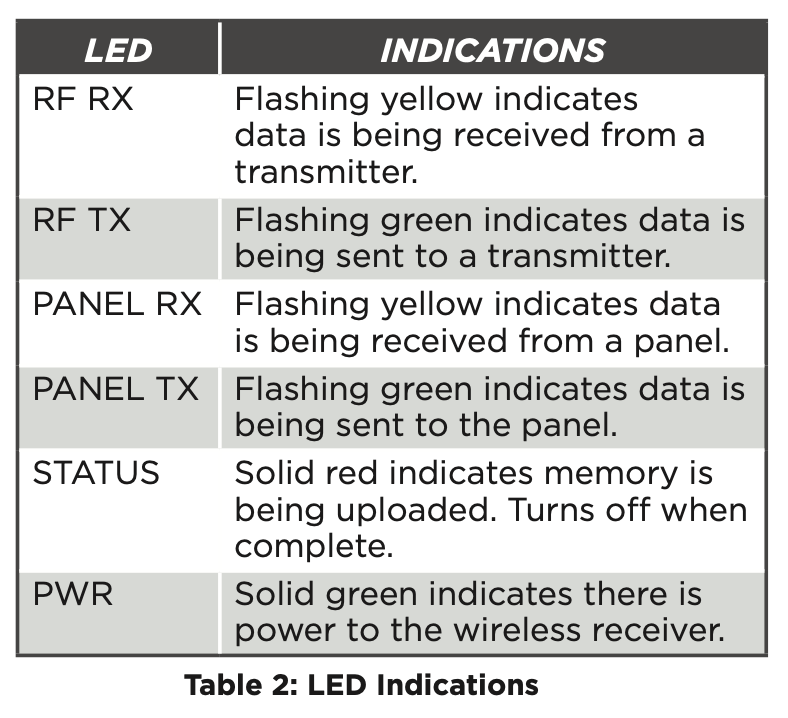
The six labeled LEDs on the 1100DH PCB display wireless receiver operation and activity. See Figure 2 for LED locations and Table 2 for LED indications.
House Code Explained
The house code identifies the panel, receiver, and transmitters to each other. The 1100DH automatically sends the specified house code to wireless transmitters when transmitter serial numbers are programmed into the panel.
The 1100DH only listens for transmissions using the specified house code or the programmed transmitters’ serial numbers.
Transmitter Supervision Time
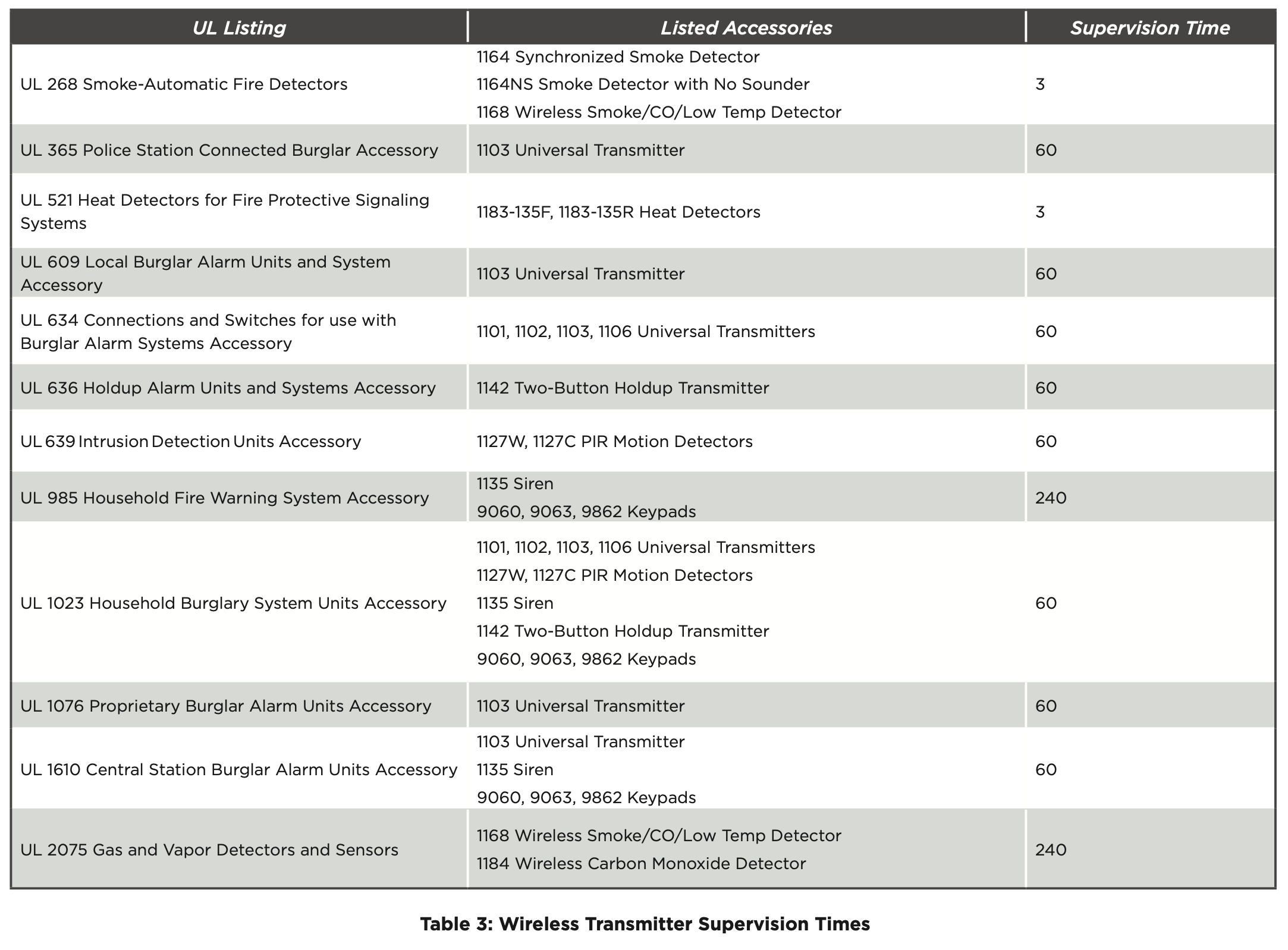
For listed installations, program the transmitter supervision time in panel zone programming as listed in the following table. Refer to the panel programming guide for complete wireless programming information.