Alarm Docs
  • Submit Article
  • Contact Us
  • About Us
  1. Home
  2. Accessories
  3. OPTEX Beams: Master/slave selector switch setting
Searching...

Other Articles

  • DMP XF6: Accessory devices
  • Reset Alula radio/communicator
  • How to add a zone to a VISTA H3
  • DMP XF6: Programming requirements
  • DMP XF6: Compatibility
  • DMP XF6: Wire the panel
  • DMP XF6: Install the panel
  • DMP XF6: Specifications Summary
  • XF6: Operating Instructions
  • Radionics: D168 Module Installation
  • PROA7PLUS: Re-register the radio
  • Install piezo on Honeywell Vista 21
  • S2000 – How to enter programming
  • DMP: Version 263 Update
  • Qolsys IQ4: Latest firmware version
  • Napco GEM-P1632: Error codes
  • Honeywell VISTA-128BPT compatible devices
  • Honeywell Vista 128BPT: ECP Error
  • Updating firmware on an Alula cellular communicator
  • How to update NAPCO StarLink firmware
  • How to adjust thermostat from IQ Panel 5
  • Create a guest code on the Qolsys IQ5
  • Programming VISTA-21iP for internet-only
  • Program user code on DMP XR/XT panel
  • Program the on-board triggers on Vista 21

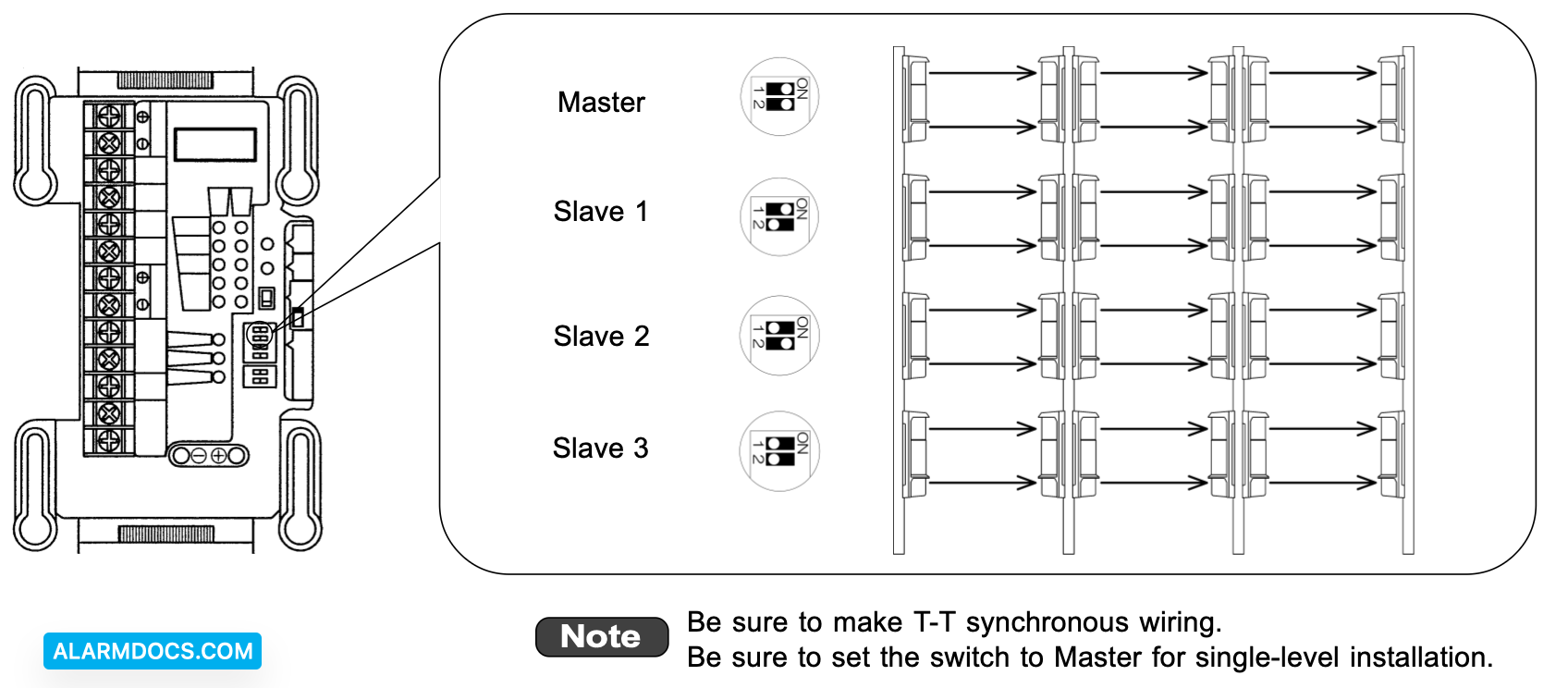
OPTEX Beams: Master/slave selector switch setting

The master/slave selector switch is provided for preventing cross talk between infrared beams for multi-level alarm. From the top level, set the switches of both the Transmitter and the Receiver to Master -> Slave 1 -> Slave 2 -> Slave 3.
Tagged: AX-350DHax350dhax350ax650ax-650AX-650DHax650dh
Was this article helpful?
Yes No
© Copyright 2026 - AlarmDocs.Com