
General Information
The 5817CBXT is a universal contact-monitoring transmitter that can be used with household and commercial fire and burglary-initiating devices such as door/window contacts, motion and glassbreak detectors, sprinkler water flow switches, tamper switches, post indicator valves, manual pull stations, and remote duct detectors. The 5817CBXT has three unique input loops (zones).
- Loop 1: Supervised and typically used for high-priority alarm reporting such as commercial fire or burglary. It requires a 470K ohm end-of-line resistor (PN EOLR 470K) to be placed across the sensor. Short circuit reports as loop 1; open circuit reports as loop 4 (tamper). Response time is approx. 320mS.
- Loop 2: Built-in, normally closed reed switch (used in conjunction with a magnet).
- Loop 3: Normally closed household burglary loop. Response time is approx. 320mS.
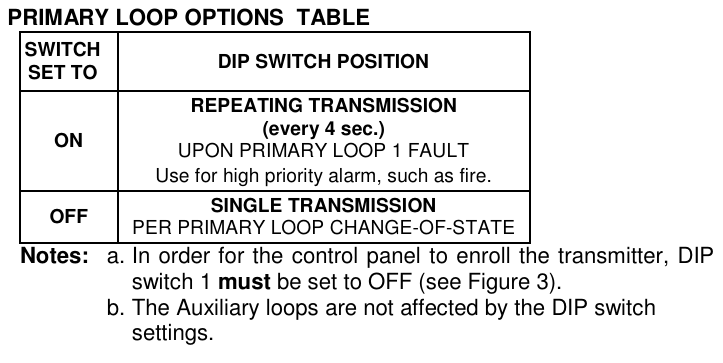
- Loop 4: Tamper loop (automatically enrolled) contains two tamper switches. A built-in cover tamper switch is activated when the cover is removed. A unit tamper switch is activated if the unit is separated from its mounting plate.
Programming
The 5817CBXT has a built-in serial number that must be enrolled in the control panel prior to its usage in the alarm system. Assign loops 1-3 to individual zones respectively. Refer to the control panel’s installation instructions for specific programming procedure. When programming the 5817CBXT transmitter, set as Input Type “RF” (i.e., supervised RF) (mandatory for UL installations).
Mounting
- Signal strength may vary from location to location. Before mounting the transmitter permanently, conduct Go/No Go tests (see control’s instructions) to verify adequate signal strength from this location.
- When a satisfactory location is found, remove the battery and proceed with installation.
- Remove the tamper switch hold down tab from the mounting plate and set it aside. It will be needed if not using the mounting plate.
- Remove the transmitter’s cover using the flat blade of a small screwdriver in the pry-off slot and twisting. To replace the cover, engage the hooks along the top edge and snap shut.
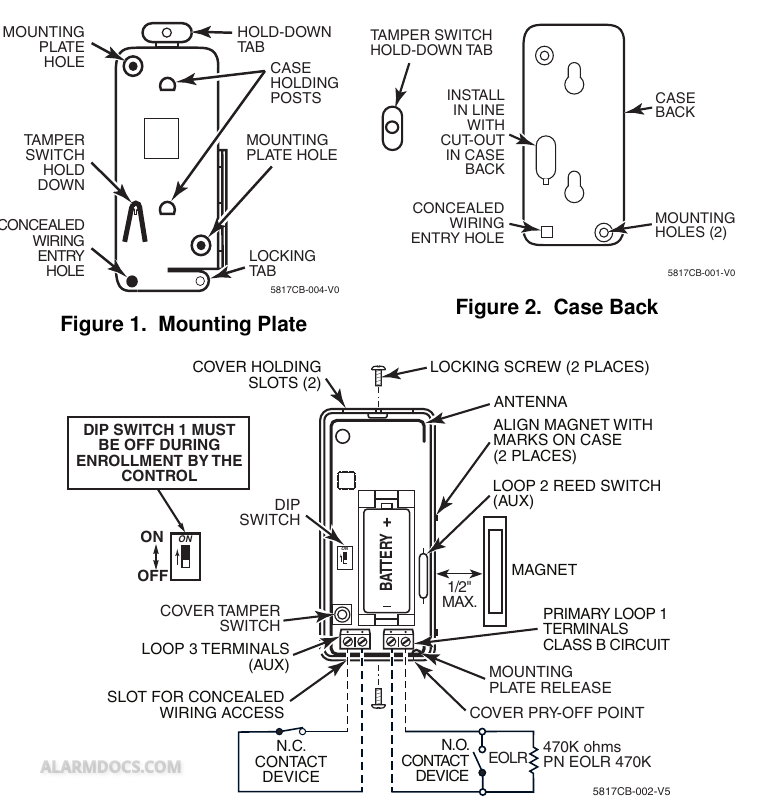
- Disengage the mounting plate from the case back by inserting the blade of a small screwdriver into the mounting plate release hole (see Figure 3) and pushing the locking tab out (see Figure 1). Slide the mounting plate downward along the case back.
For Concealed Wiring:
Feed the wires through the concealed 5817CB-004-V0 Figure 2. Case Back wiring entry hole at the bottom corner of the mounting plate (and/or Figure 1. Mounting Plate case back).
For Surface Wiring:
Remove the knockout slot in the case back (near loop 3 terminal block).
If Using the Mounting Plate (for easy removal later for servicing):
Install the mounting plate in the location determined, with its case-holding posts pointing up. Use two flat head dry-wall screws. NOTE: To ensure proper operation of the unit’s back tamper, the screws must be anchored to a wall stud or other solid wood B 1/2″ material.
Attach the case back to the mounting plate by sliding the keyhole slots in the case back down onto the mounting plate’s holding posts. The locking tab clicks as the case back locks in place.
If Not Using the Mounting Plate:
Make note of the location of the tamper switch hold-down as shown in Fig. 1 for the proper placing of the hold-down tab in Fig. 2.
Remove the PC board from the case back. Slide a small flat bladed screwdriver between the case back and PC board near the board hold-down clip and carefully pry the board out.
In the area that was marked, install the hold-down tab with a 5/8” flat head dry-wall screw. The tab must be aligned with the corresponding slot in the case back as shown in Figure 2. The tab as well as the case back must be anchored to a wall stud or other solid wood material.
Mount the case back to the wall using two flat head dry-wall screws, anchoring it to a wall stud or other solid wood material.
Reinstall the PC board into the case back, position the board onto the two retaining studs on one side of the case back and snap the board into place. The hold-down tab must mate with the corresponding cutout in the case back after case back is installed.
Set the DIP switch (after the control panel has enrolled the transmitter loops) for the desired primary loop characteristics, as described in the Primary Loop Options Table.
Wiring Connections
- Connect the loop wiring to the unit’s terminals before installing the battery (see Figure 3).
- Primary loop 1 is a supervised loop and must have an end-of-line (EOL) resistor (470K ohms, supplied) placed across the last sensor. Additionally, for Primary loop 1, a contact device may not be installed more than 20 feet from the transmitter.
- For UL household burglary and fire installations, the loop 3 contact device (if used) may not be more than 3 feet from the transmitter.
Testing
Regular maintenance and inspection (at least annually) by the installer are vital to continuous satisfactory operation of any alarm system. The installer should instruct the user to test the system frequently (at least weekly) to insure the system’s operation at all times, as well as offer a regular maintenance program to the user. The user should also be acquainted with proper operation and limitations of the entire alarm system.
UL Requirement
- If using a compatible commercial control panel (ex. VISTA Turbo series) and programming the 5817CBXT as an Entry/Exit zone, you must enroll the tamper loop (loop 4) as a separate zone, programmed for 24-hour response (e.g., Zone type 5 Trouble-byday/Alarm-by-night).
- For UL Commercial Burglary installations, this transmitter must be used in conjunction with the 5881ENHC RF Receiver.
Specifications
- For spaces. dry, indoor use only. Do not install in air-handling
- Dimensions: 1-9/16″W x 3-1/2″H x 1-3/16″D (40mm x 89mm x 30mm)
- Battery: 3V Lithium (see BATTERY INSTALLATION/REPLACEMENT).
- Signal Level: To determine ambient noise level and signal strength, refer to compatible receiver Installation and Setup Guide. NFPA-72 Compliant.
- UL Listings: Commercial Fire…….UL864 Household Fire………UL985 Household Burg……..UL1023 Commercial Burg……UL365, UL609, UL634, UL1076, UL1610