The capacity of the GEMC-Series control panels may be expanded through the use of a GEMC-EZM8 Zone Expan- sion Module. Each GEMC-EZM8 module provides up to 8 additional zones, and may be configured to provide for ei- ther 4 zones or 8 zones. Using either configuration, several GEMC-EZM8 modules may be combined as necessary to supply the required number of zones to the GEMC-Series control panel. Refer to the GEMC-Series control panel installation instructions (WI1653) for wiring requirements.
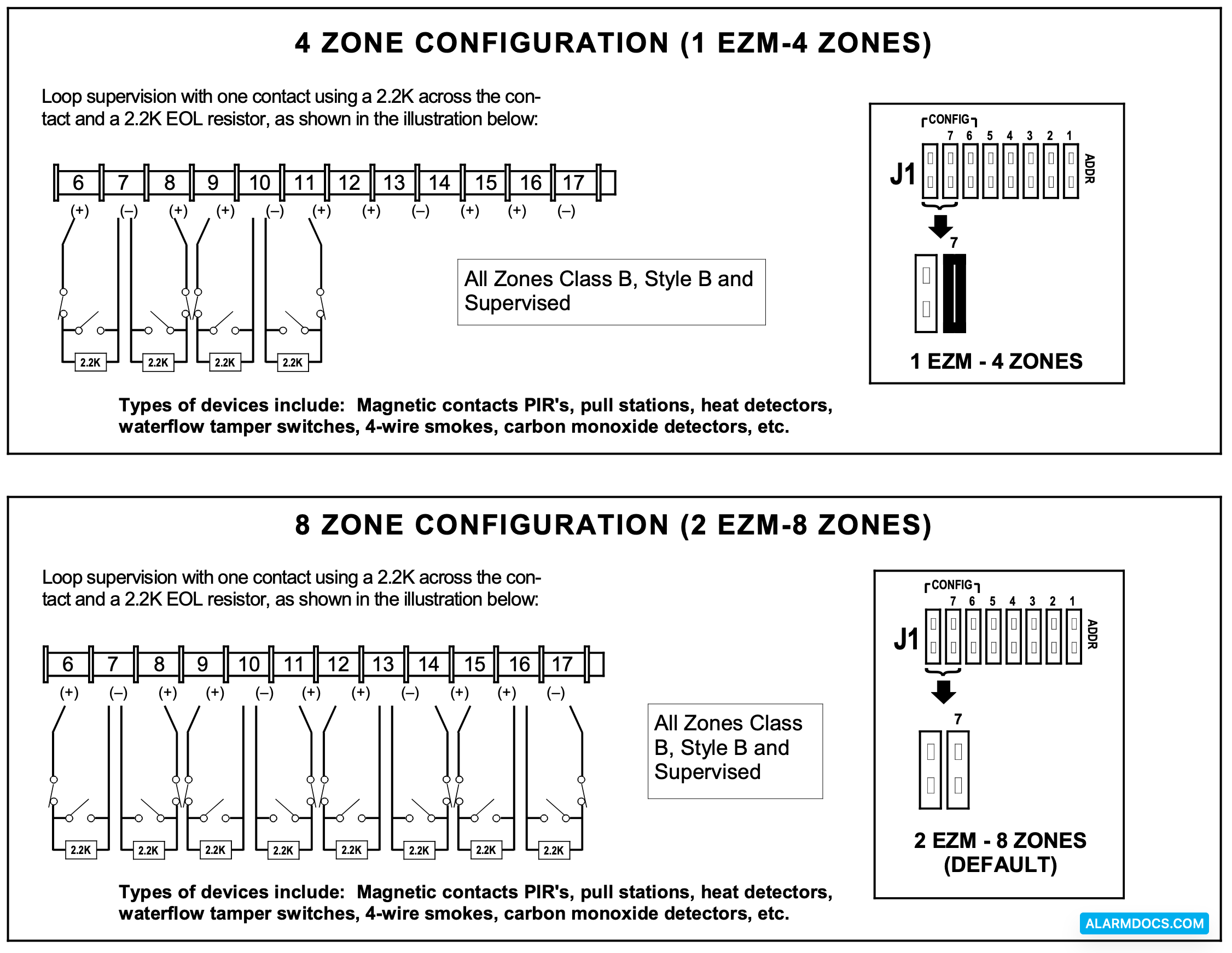
4 OR 8 ZONE ASSIGNMENT
Regardless of how the modules are arranged, the expansion zones are divided into consecutively-numbered groups of four. Each module may comprise 1 group (4 zones) or 2 groups (8 zones). NOTE: The default setting is 2 groups (8 zones). Place jumper J1 on #7 for 4 zone, remove for 8 zone.
BASE ADDRESS ASSIGNMENT
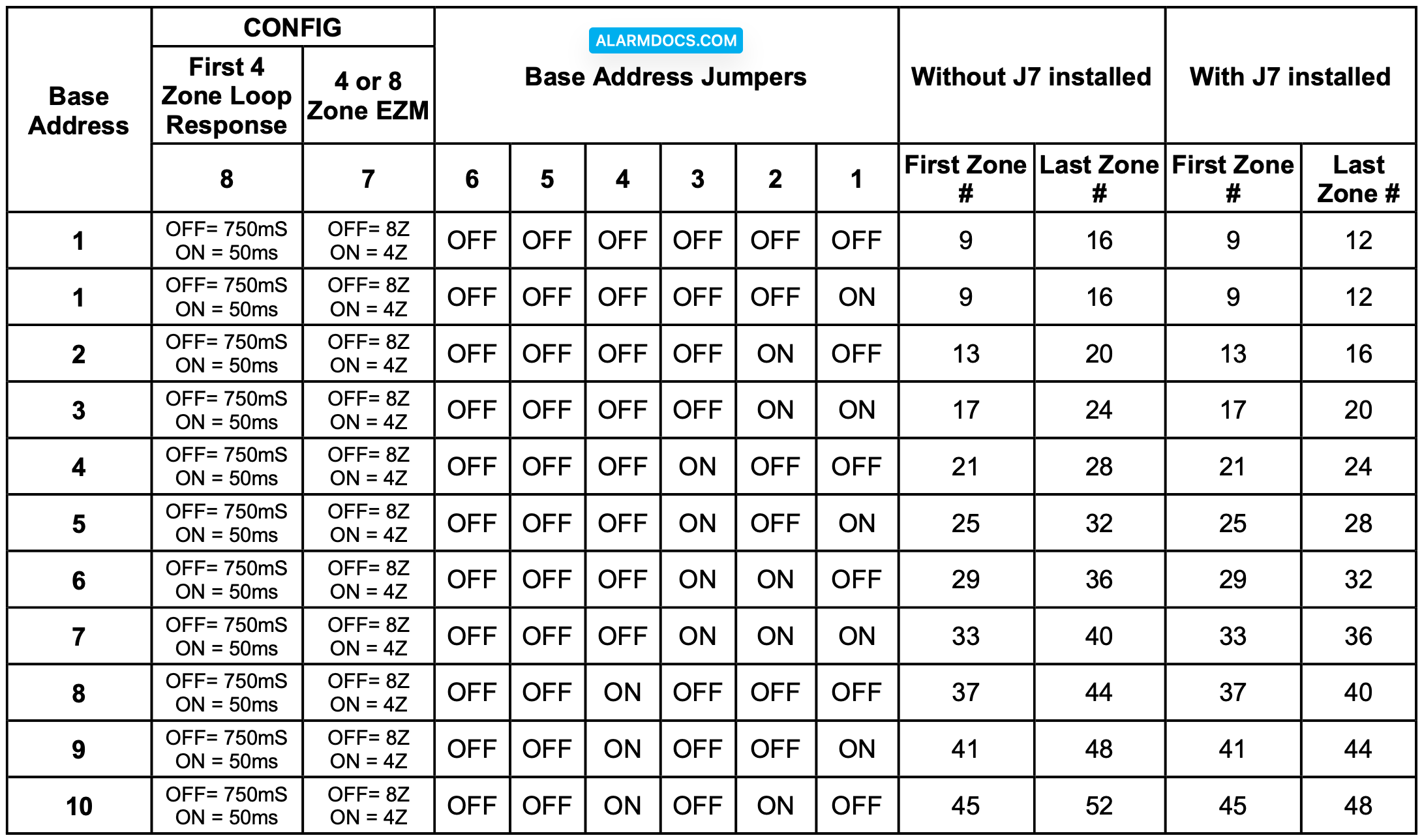
Every module must be assigned a unique “base address”. The Base Address indicates which zones the module will contain. The base address depends on the number of zones used by the previous module or by the control panel. NOTES: (1) Groups must be numbered consecutively, that is, missing numbers are not permitted.
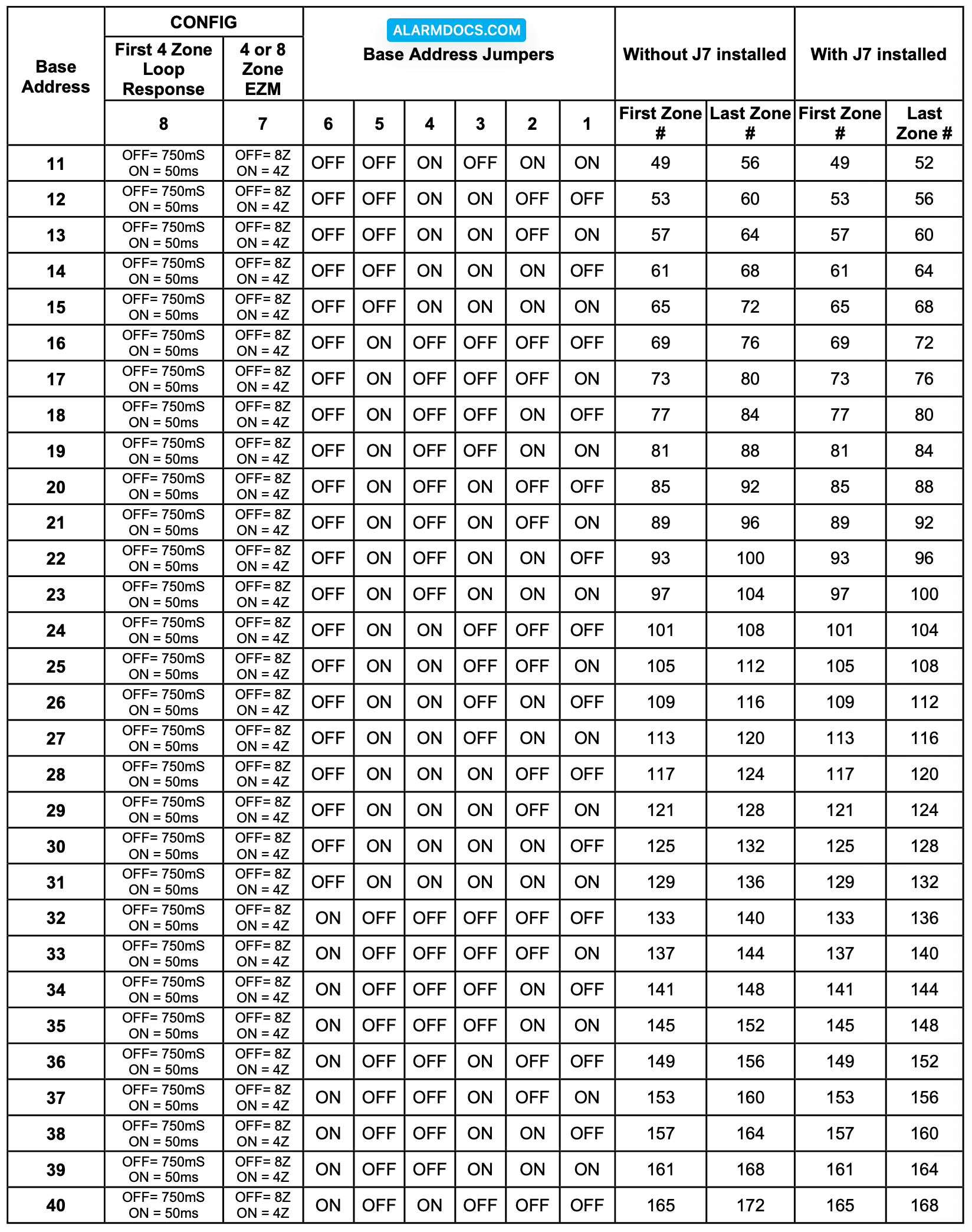
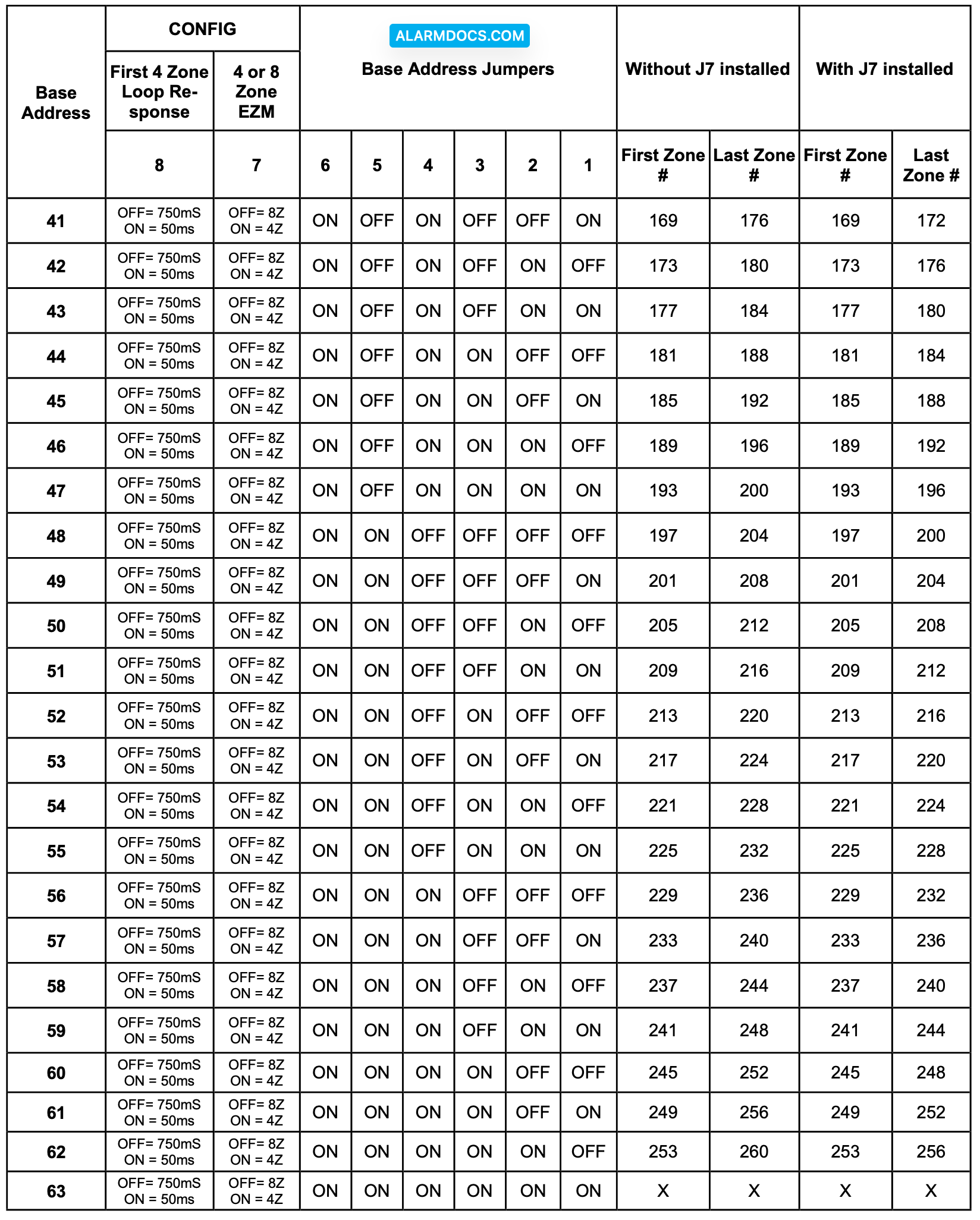
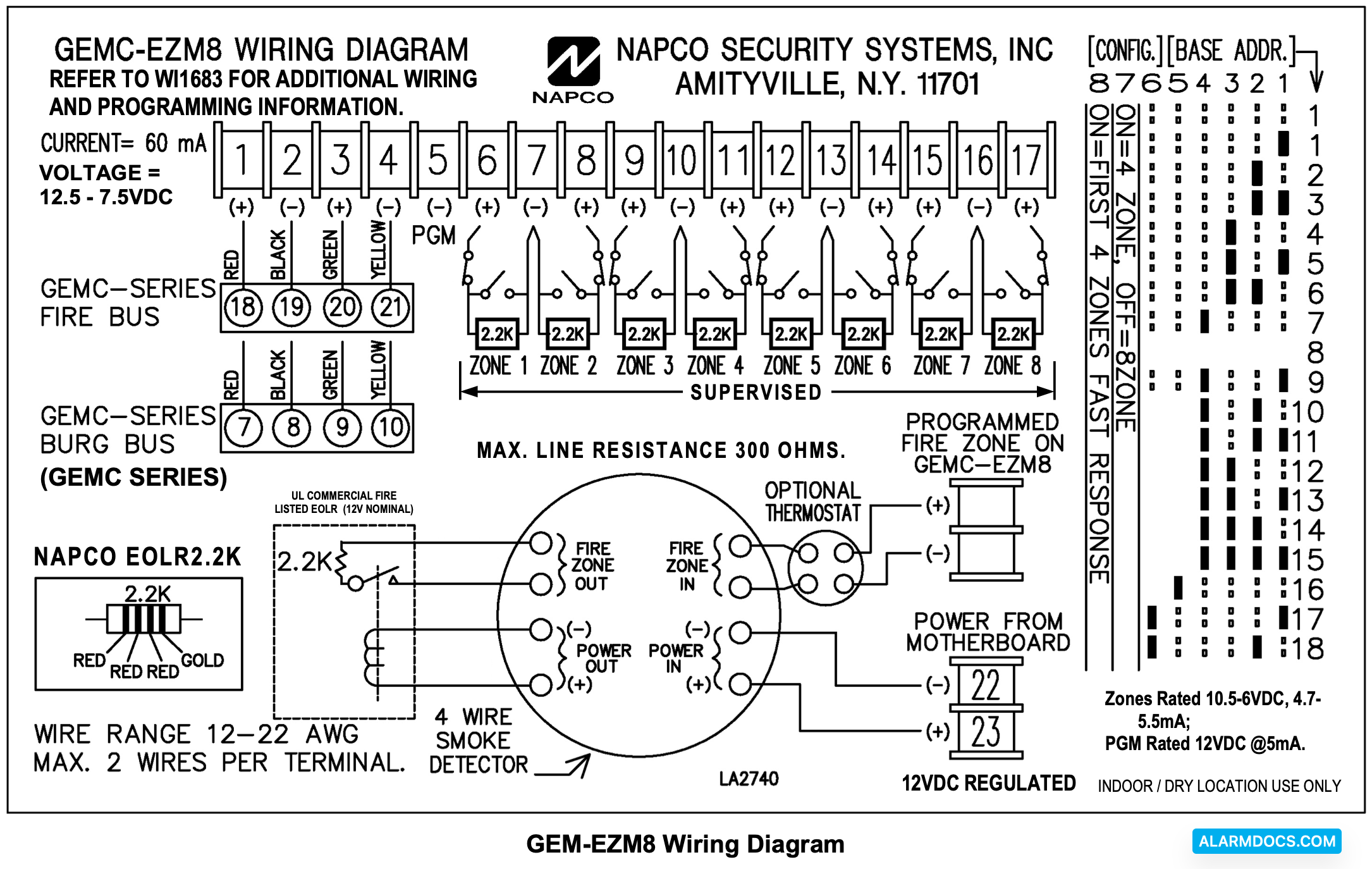
The base address is assigned to the module by proper selection of Address Jumpers (to the right of the LED) in accordance with the following tables. Also refer to the Zone Wiring Diagram.
PROGRAMMING
The control panel must be programmed with regard to the total number of zones required. When keypad programming the control panel for the first time, the first programming option of the Easy Menu Driven Program Mode will be to enter the total number of zones in the system, rounded up to the nearest four. You can then support this total by adding the appropriate number of GEMC-EZM8 modules which can be configured as 4 or zone modules. The number of modules required is a function of the number of zones required as well as the configuration of the EZM’s. If 24 additional zones are required (8 zones) is chosen, the number of EZM’s required will be 24/8 = 3 EZM’s. When downloading a control panel, the total number of zones is determined on the Zone Features screen by activating the required number of EZM modules in the System Configuration screen.
TAMPER
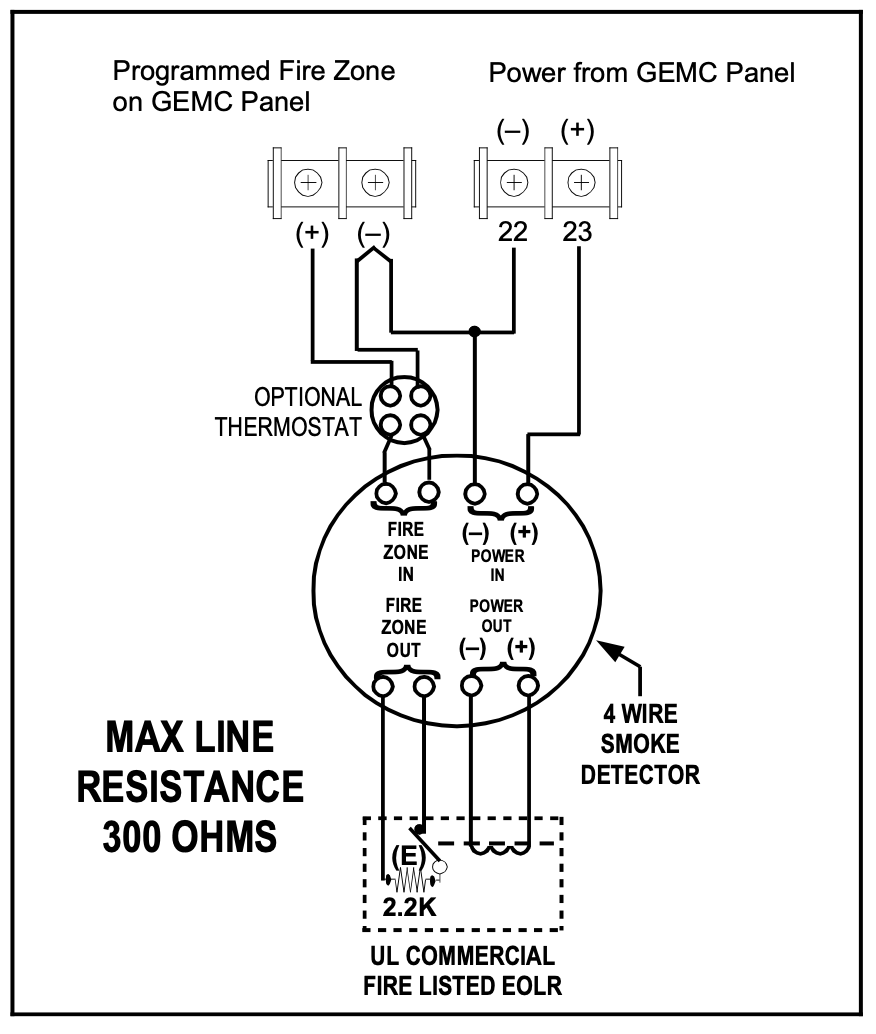
If the cover is removed or if the module is removed from the wall, the keypad sounder will pulse, and the display will indicate a zone- module tamper condition along with the module number. Press RESET to silence the sounder. Note: The EZM tamper displays dif- ferently depending on the bus to which it is wired. Note: The tamper will NOT function when used on a GEMC-Series control panel Fire system or Combination Fire/Burglary system (when the GEMC-EZM8 is programmed as a 4 Zone Fire type or 8 Zone Fire type in the Quickloader System Assignment screen).
LOOP RESPONSE
Loop response times for Zones 1 through 8 are programmed in the control panel. Normal loop response for all expansion zones is 750mS. The module already comes without the jumper installed (defaulted to 750mS). To reduce the response time of zones 1 through 4 of the EZM Module to 50mS, add the Loop Response Jumper (jumper # 8 on = 50mS; off = 750mS). To enable normal loop response (750mS), remove the jumper. Refer to the Wiring Diagram. DO NOT ENABLE THIS FEATURE IN UL INSTALLATIONS.
STATUS LED
The Status LED displays the condition of the zone module. The following is a list of conditions for the LED:
1. OFF = Control Panel has no power applied.
2. ON Steady = Control Panel has power applied but the panel is not polling because:
- a. the panel is in “CONFIG”,
- b. the panel is not programmed correctly to poll the address of the EZM,
- c. the GRN wire is not connected correctly.
3. PULSES off the EZM groups that are being polled.
- a. If the first EZM group (the base number) is polled the LED is normally on and pulses off once slowly.
- b. If the first and second EZM group are polled then the LED is normally on and pulses off once then twice sequentially.
- c. If the first, second, third and fourth groups are polled the LED is normally off and will pulse 1, 2, 3, 4 sequentially.