
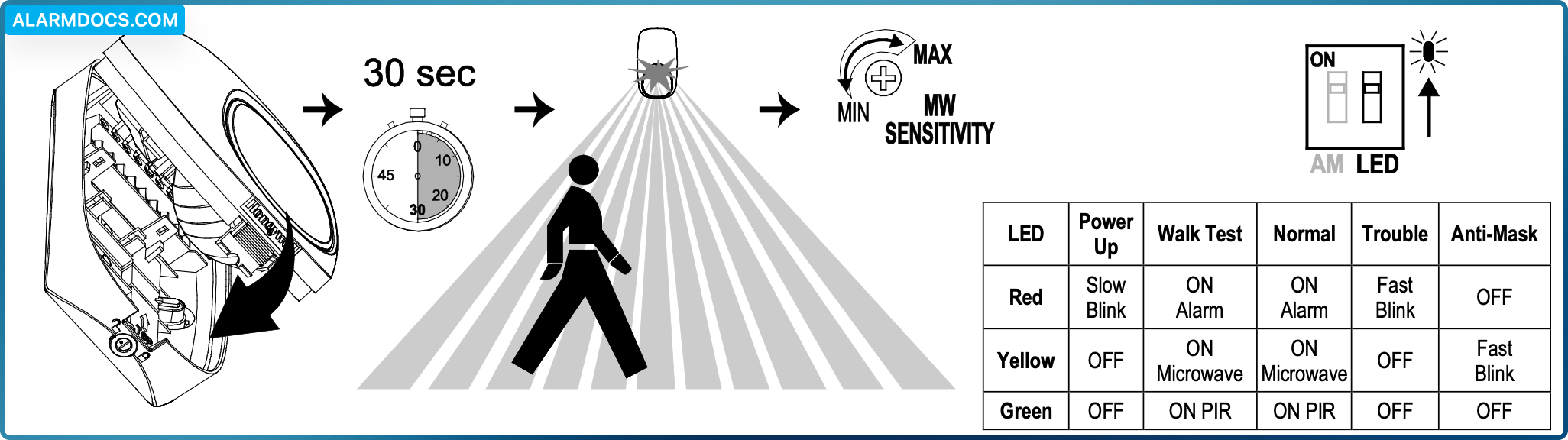
- Apply power to the sensor. Initialization is complete when the LED stops flashing slowly (about 30 seconds).
- Turn the microwave sensitivity counterclockwise to reduce the microwave range (minimum = 16.4’ / 5m) and close the sensor.
- Walk through the detection area and observe the LED.
- Adjust the microwave range as necessary to meet installation requirements.
Walk test mode is active for 10 minutes, then automatically exits test mode, disables the LED and enters normal operation mode. For an additional 10 minute walk test, enable walk test mode again with the flashlight feature:
Flashlight Feature:
- Use a flashlight with a bright light beam, and stand within 4’ (1.2 m) of the sensor.
- Swing the light beam past the sensor IR window 3-5 times, holding the beam on the window for 0.5 second each pass.