
The IQ4 v4.3.0 and higher version panels have a feature that can display the ambient temperatures detected by PowerG devices. This feature allows the client to review a list of PowerG devices and see the ambient temperature readings from these devices.
To enable the option, go to :
Settings >Advanced settings > Installation > Dealer/Installer settings > Temperature Reporting – Check the box
The third tab on the security page (Active /ALL/Ambient) shows the temperature from various PG devices.
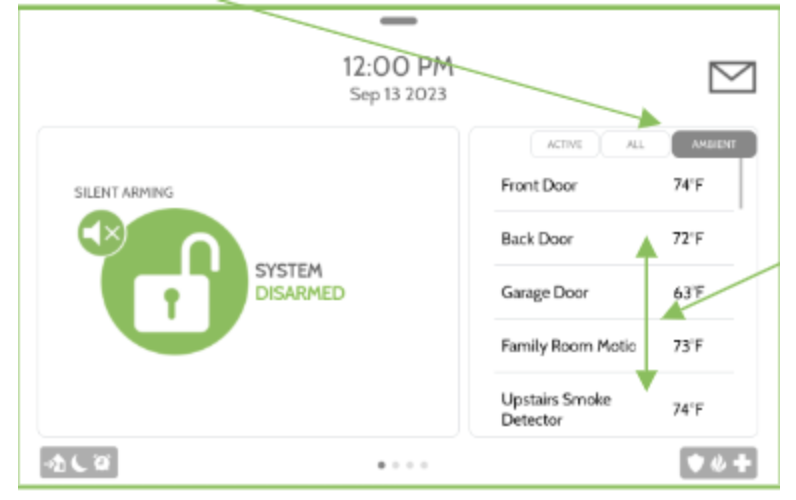
The temperatures can be viewed in degree C or Fahrenheit (F) ( can be changed under the settings tab).
These are the list of compatible sensors that has the option of temperature reporting :
- 107 PGx312 Outdoor Contact w/External Input
- 110 PGx309 Contact w/External Input
- 111 PG9200AX Short Range IR Receiver
- 112 PG9920AX Short Range IR Transmitter
- 113 PG9350SL Long Range IR Receiver
- 114 PG9350SL Long Range IR Transmitter
- 126 PGx914 Flat PIR
- 127 PGx862 Ceiling PIR
- 128 PGx872 Commercial Ceiling PIR
- 129 PGx902 Outdoor Curtain PIR
- 150 PGx984 Dual Tech PIR/Microwave
- 161 PGx922 Glass Break Detector
- 202 PGx936 Smoke/Heat Detector
- 202 PG9936H Heat Detector
- 221 PGx933 CO Detector
- 250 PGx905 Temperature Sensor