General Information
The LTE-L57V / LTE-L57A / LTE-L57C Cellular Communication Modules allow the LYNX Touch L5210 and L7000 controls to communicate with the Central Station via the LTE cellular network.
Installing the Communication Module in the LYNX Touch Series Control
- 1. Install the provided FCC label (LTE-L57V: 800-23737 or LTE-L57A/LTE-L57C: 800-23737-1V1) on the control’s case back (see diagram).
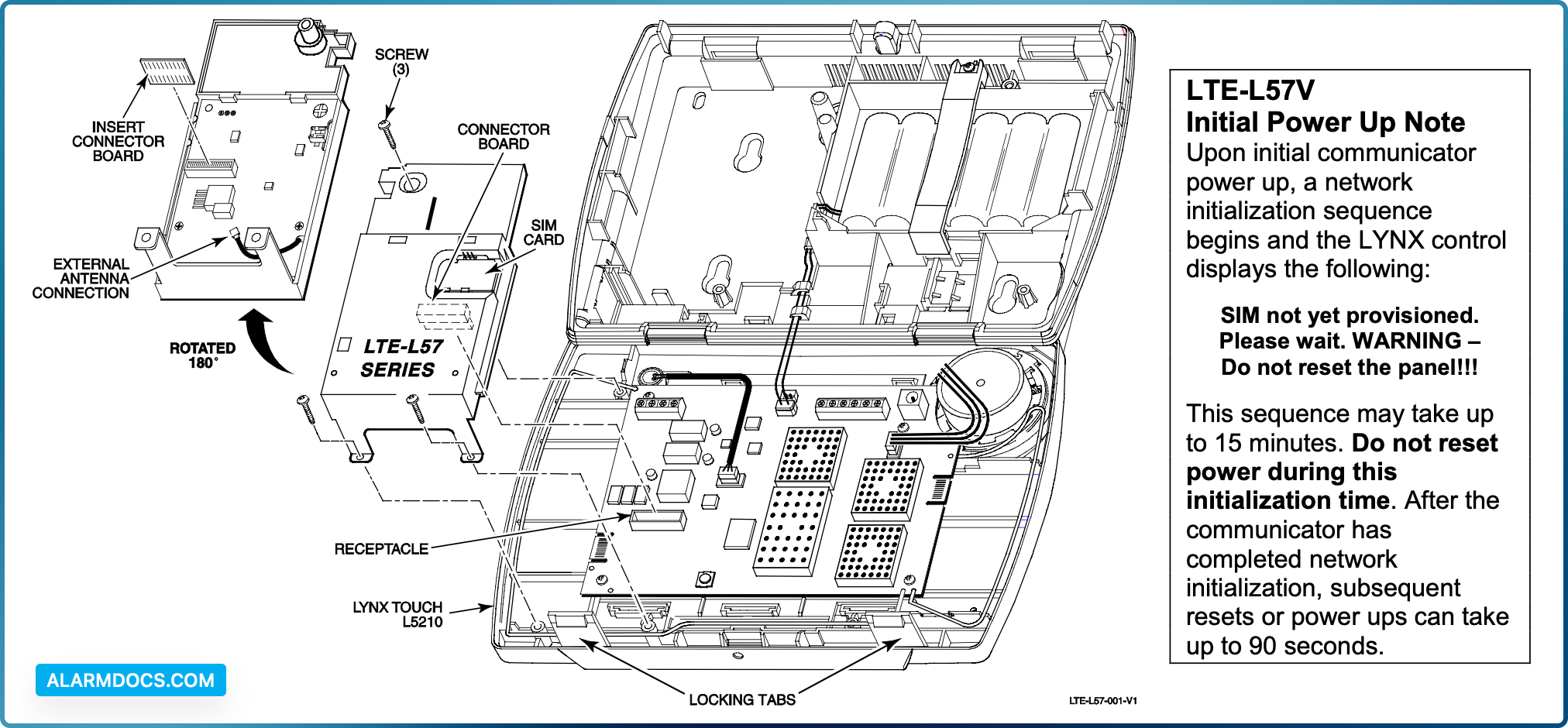
- 2. Release the LYNX Touch front case from the back case by depressing the two locking tabs at the top of the unit with the blade of a medium size screwdriver (see diagram below).
- 3. Install the communication module into the LYNX Touch control front case as shown. Ensure that the connector board is properly seated into the receptacle on the control.
- 4. Secure the module with the three provided screws.
- 5. Enable the communication module, configure alarm reporting and module supervision and register the device. Refer to the “Program the Radio” and “Diagnostics” sections in the LYNX Touch Series Installation & Setup Guide (p/n 800-19974V1 or higher).
Checking Signal Strength
When choosing a suitable mounting location, check the communicator’s signal strength to ensure proper operation. For most installations, using the module’s internal antenna, mounting the control as high as practical, and avoiding large metal components provides adequate signal strength for proper operation. Use the “Cell Information” screen to display signal strength (in dBm).
Select: Security > More > Tools > [Installer Code] > Program > Comm. Diagnostics > Cell Information Primary Site QOS Level Signal strength is displayed by a series of 1 to 5 stars (* weak to strong) or “Not Present” if there is no signal. To ensure a reliable installation at least 2 (*) stars should consistently be present.
If necessary, relocate the Control to obtain better signal strength (press Cell Information again to refresh the reading) or install an external antenna.