
There are seven steps in installing Telguard properly. IF YOU DO NOT PROCEED IN THE ORDER AND MANNER PRESCRIBED, YOU MAY NOT COMPLETE THE INSTALLATION IN THE TIME ALLOCATED.
STEP 1: REGISTER FOR CELLULAR SERVICE
Register the unit online through www.telguardonline.com, by completing the Online Registration Form at www.Telguard.com. Telguard requires this information to activate the unit.
STEP 2: LOCATE UNIT AND MEASURE SIGNAL STRENGTH (RSSI)
First, you will be confirming that Telguard has adequate cellular signal strength. Press the LED Mode Toggle button, LEDs will now indicate signal strength. Minimum recommended is 2 ½ (2 on solid and the third flashing). ). The LED Mode will reset to normal automatically after 10 minutes or after pressing the LED Mode Toggle button again.
STEP 3: TRANSMIT PANEL ALARMS OVER THE TELCO CONNECTION
Next, you will verify that the alarm panel is programmed properly. This step is important to verify that the alarm panel is programmed with valid account code and central station information before transmitting signals through the cellular network.
STEP 4: PROGRAM, ACTIVATE & TRANSMIT PANEL ALARMS OVER THE CELLULAR RADIO NETWORK
Next, you will be connecting the alarm panel’s digital dialer output to Telguard and verifying that alarm signals can be reliably sent through Telguard over cellular to the central station digital receiver. The incoming Telco line is not connected to Telguard during this step. A minimum of two alarm signals must be transmitted. Activation is confirmed when LED 1 is illuminated.
STEP 5: CONNECT SUPERVISORY TRIP OUTPUTS
Next, you will wire Telguard’s supervisory trip outputs to the alarm panel and then test.
STEP 6: CONNECT TRIP INPUT (OPTIONAL)
Optionally, you can wire an external relay input to the trip input lead and ground, and test.
STEP 7: COMPLETE THE INSTALLATION
Your last step will be to attach earth ground, and permanently mount the unit.
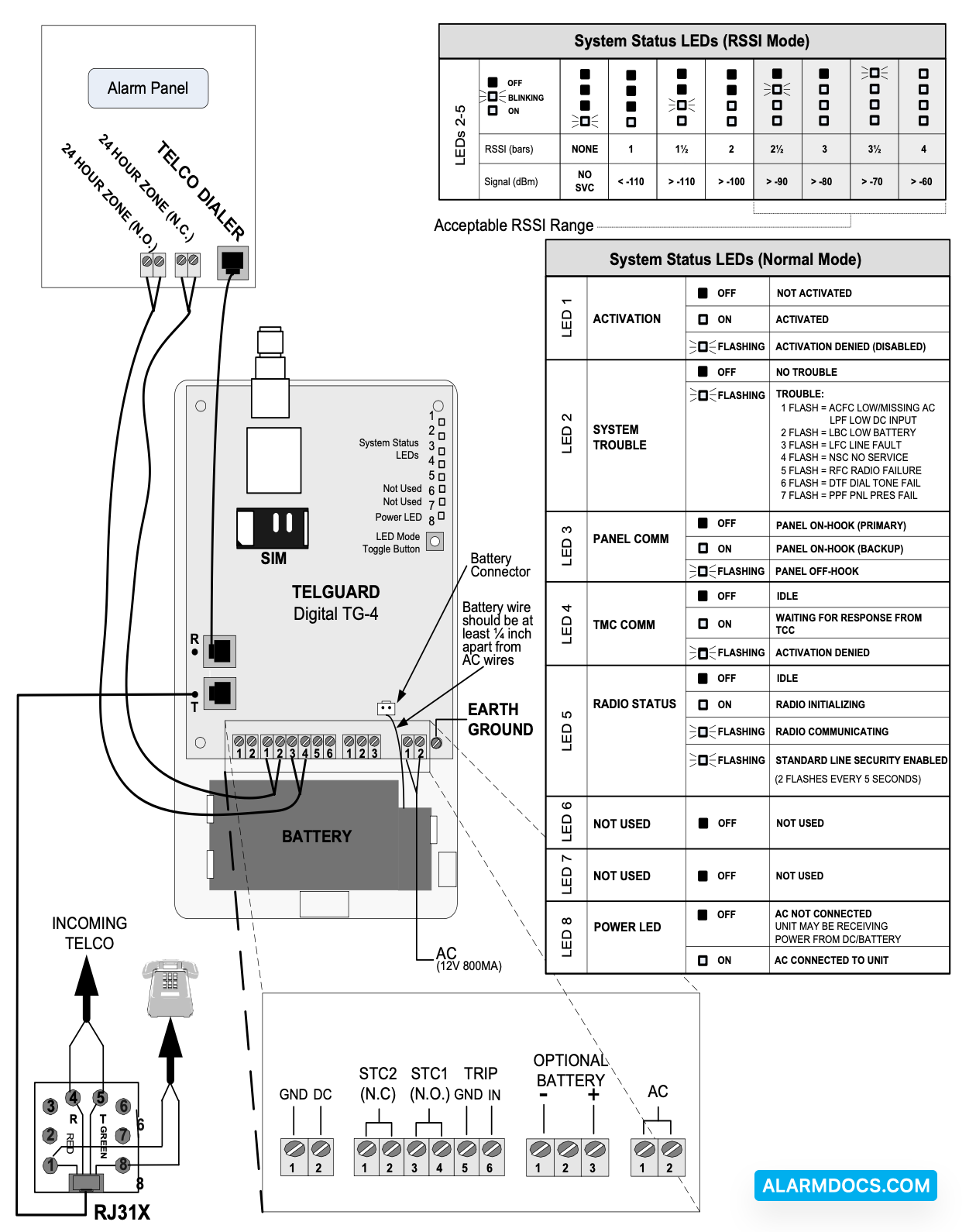
Setup & Programming the Operating Parameters in the Telguard TG-4
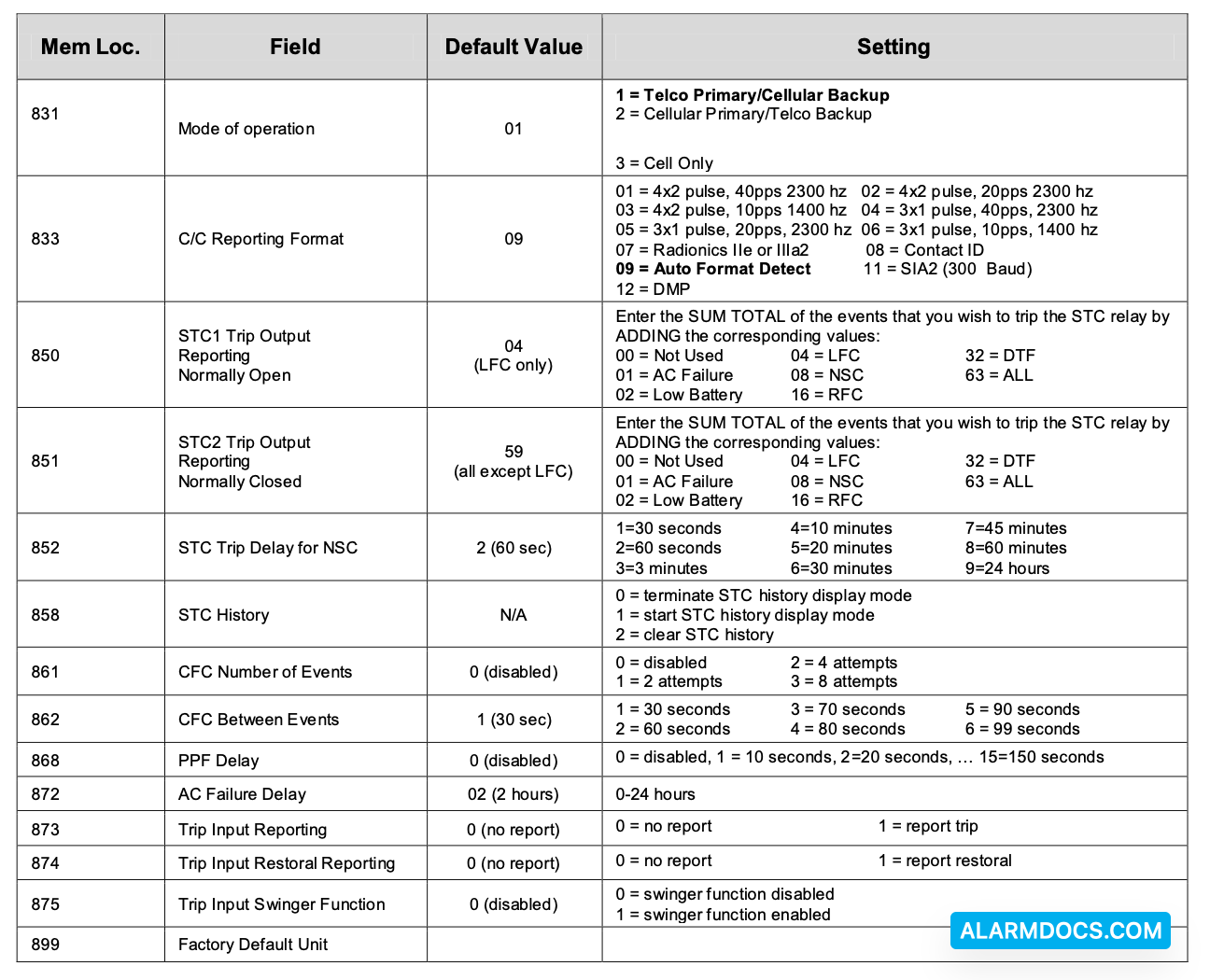
When the Telguard is received from the factory and is powered up for the first time, it is immediately ready for activation, provided the default settings are what you want (note: registration form must be sent to Telular). The STC LED # 2 will flash to indicate any failure conditions. The Mode LED # 3 will be on and the STC 1 and STC 2 relays will be tripped. If changes are required to the default settings, the Telguard can be programmed using a line-mans butt-set connected to T & R Test Points or a POTS phone connected to the panel RJ-45 jack (black connector where the alarm panel is normally connected).
TO PROGRAM THE Telguard TG-4
A. Put the line-mans butt-set in talk mode or pick up the POTS phone.
B. Connect power to the Telguard, when ready for programming you will hear 2 beeps.
C. Press #, *, this will put the Telguard into a Master Access programming mode, 2 beeps.
D. Enter changes required. The syntax for programming a specific memory location is as follows:
MEMORY LOCATION (3-digits), will respond with 2 beeps, then VALUE, will respond with 2 beeps.
E. Then press *, you will hear 2 beeps then hang up. This saves the change and exits the programming mode.
If the Telguard fails to confirm activation it will be displayed on the LEDS:

On either a FAILED ACTIVATION or ACTIVATION ERROR, the unit MUST BE RESET BY PRESSING THE RSSI BUTTON TWICE. The activation message MUST BE RESENT or the TELGUARD will transmit all signals through the telco connection.