
The Model 323 and 324P are wire-in transformers on a mounting plate to be installed in any 350 or 350A enclosure. These transformers are designed to provide power for XR Series Control Panels.
The 323 is a 16 VAC 56 VA wire-in transformer that provides up to 2 Amps of power. The 324P is a 16 VAC 100 VA wire-in transformer that provides up to 3 Amps of power.
MOUNTING THE TRANSFORMER
Use the following steps to mount the 323/324P Transformer:
- 1. Slide the mounting plate into the top position of the mounting bracket at the top of the 350 or 350A enclosure.
- 2. Using the supplied screws, secure the lower edges of the mounting plate into the permanent standoffs in the 350 or 350A enclosure.
PANEL 3-PIN HEADER
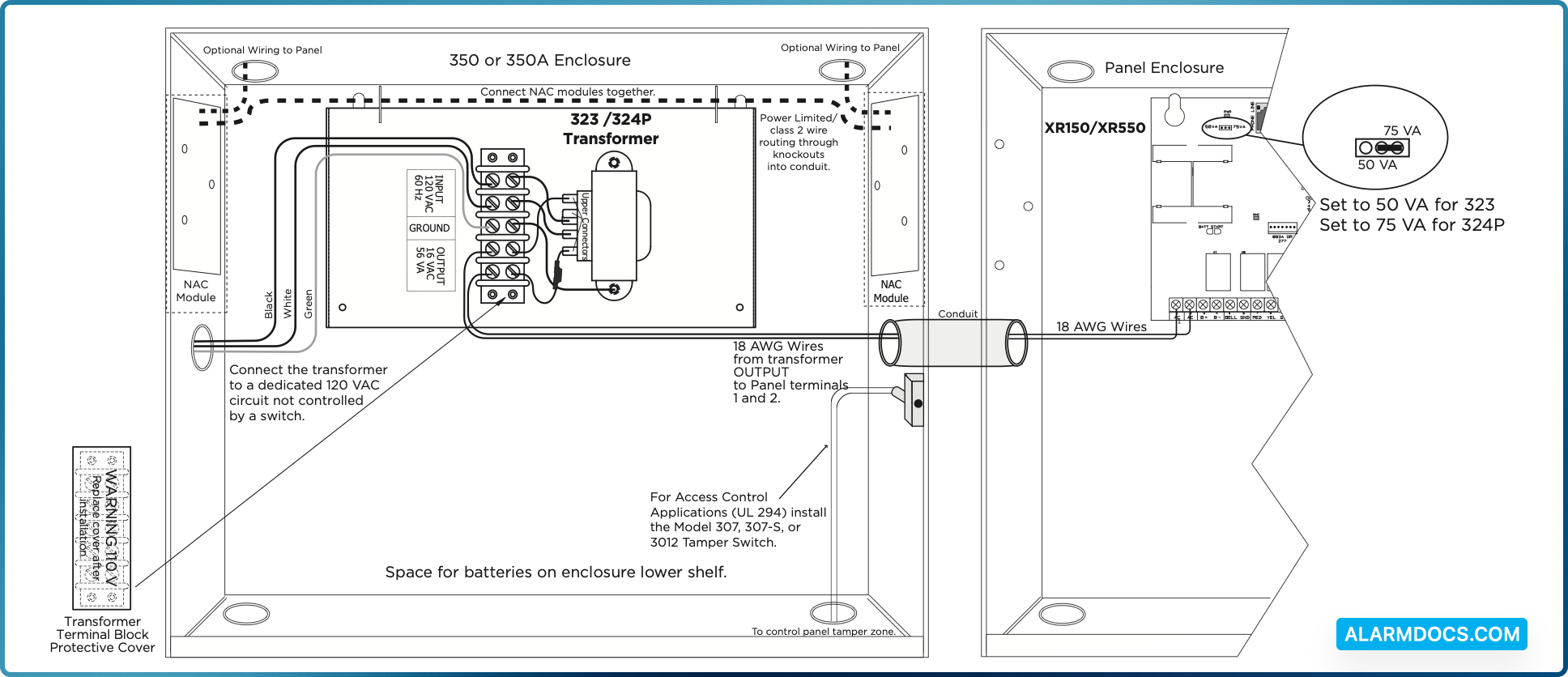
For the 323, place the jumper on the left two pins labeled 50 VA for a maximum 2 Amps (Bell+Aux+Smoke=2 Amps) when using the Model 323 56 VA transformer (default setting).
For the 324P, place the jumper on the right two pins labeled 75 VA for a maximum 3 Amps (Bell+Aux+Smoke=3 Amps) when using the Model 324P 100 VA wire-in transformer.
WIRING THE 323/324P
Use the following steps to connect the transformer to the panel:
- Carefully remove the protective cover located over the terminal block.
- Cut two lengths of 18 AWG wire to run from the transformer through the conduit and into the panel enclosure.
- In the transformer enclosure, connect one 18 AWG wire to one of the OUTPUT terminals. Connect the other 18 AWG wire to the second OUTPUT terminal.
- In the panel enclosure, connect the other ends of the 18 AWG wires to panel terminals 1 and 2.
Connect the transformer to a 120 VAC dedicated circuit not controlled by a switch:
- Connect the black, white, and green (GROUND) AC wires to the transformer INPUT and GROUND terminals.
- Snap the protective cover onto the plastic standoffs to cover the terminal block.
UNDERWRITERS LABORATORY (UL) LISTED
- ANSI/UL 294 Access Control System Units
- Level I: Destructive Attack, Line Security, Standby Power
- Level IV: Endurance