
5800 Mini – One Zone Door/Window Transmitter Installation Instructions
- Single zone Door/Window Transmitter
- Compatible with alarm systems that support 5800 series wireless devices
- Built-in unique serial number which must be enrolled into the control panel
MOUNTING
- Choose a mounting location where the device is stationary and the magnet is mounted to the moving part of the door or window.
- Verify adequate signal strength by using the control panel’s Go/No Go test (see control’s instructions) before mounting permanently.
- Avoid mounting in areas where it will be exposed to moisture or where the operating temperature of 32 to 120ºF (0 to 50ºC) will be exceeded.
- Keep the 5800MINI and magnet away from metal or metallic surfaces such as foil wallpaper.
- Avoid mounting the 5800MINI in areas with a large quantity of metal or electrical wiring, such as a furnace or utility room
1. Mount the 5800MINI & Magnet
- Mount the 5800MINI on the frame of the protected door or window using double-faced tape (supplied).
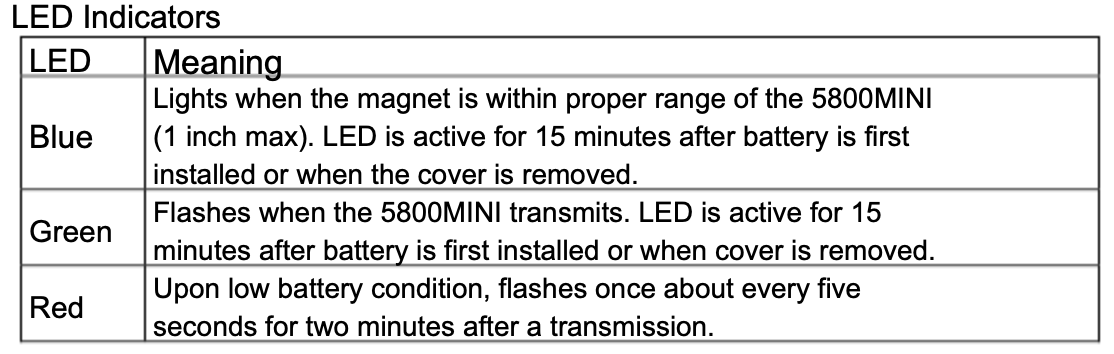
- Mount the magnet (supplied) on the protected door or opening portion of the protected window. Check that the blue LED lights when the door or window is closed.
2. Pull the Battery Tab
- Snap the cover in place after pulling tab. The blue and green LEDs will be active for 15 minutes. To reactivate, remove the cover.
PROGRAMMING
- From the main screen with the system disarmed, enter your Installer Code + 800. The default installer code is often 4112.
- The keypad should indicate that you are in programming mode.
- Enter *56 to access zone programming.
- Press 0 to continue to the first zone number.
- The system will prompt you to select an available zone number for the sensor. Wireless sensors are typically assigned a zone number higher than 8, as zones 1-8 are for hardwired zones.
- Follow the prompts to program and configure the sensor.
- When prompted, set the zone type. For a door/window sensor, this is often 03 for an instant zone or 01 for an entry/exit delay.
- Set the input type to
RFfor the wireless transmitter. - You can manually enter the serial number when prompted
- Alternatively, you can auto-enroll it by activating the transmitter. At the prompt, move the magnet close to the sensor and pull it away twice. The panel should then recognize the serial number.
- After the serial number is enrolled, the panel will move to the next programming step. Press
[*]to proceed or[#]to go back. - When finished programming the zone, you can exit programming mode by pressing 00 to exit zone programming and then *99 to exit system programming.