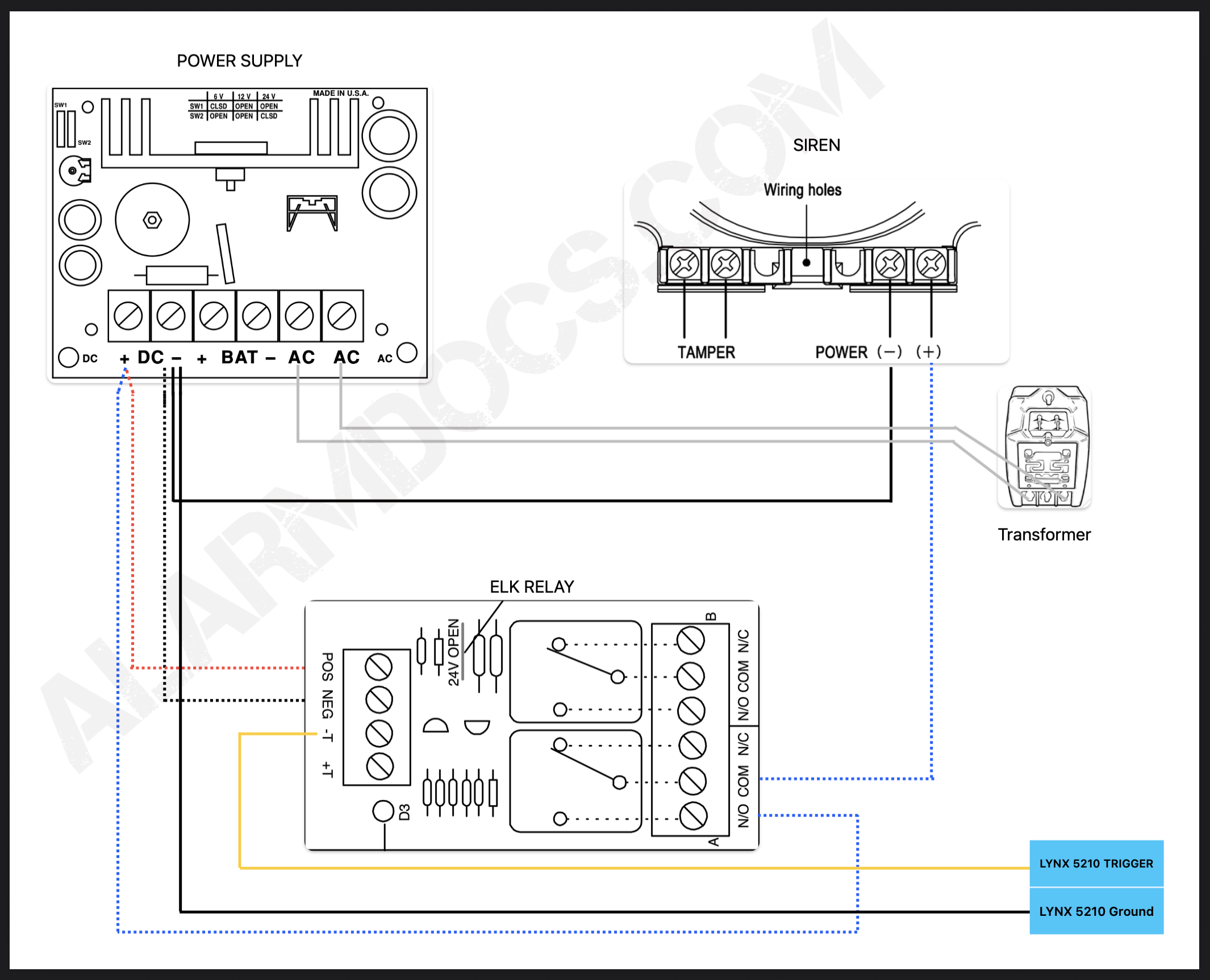
To install an external siren, you need to enable a few options in the programming and require a power supply with a relay. Refer to the image below for more details.
Create a rule
To program a trigger on a Lynx 5100 security panel, you typically create a Rule in the panel’s programming menu (Installer Code 4112) that links a Start Event (like a burglary alarm) to an Action, such as activating a connected relay or Z-Wave device (like a siren or light), using a specific Trigger Output for that action, often stopping when the bell times out or the system disarms.
Create Rule #1
- Enter Programming: From the main screen, tap More > Tools, then enter the default Installer Code (4112).
- Access Rules: Navigate to Rules > Add New
- Name the Rule: Give it a descriptive name, like Siren ON
- Set Trigger Type: For the Type, choose Trigger Output
- For action select Permanent ON
- For the start system operation select any burglar alarm
- For the stop system operation select bell timeout
Create Rule #2
Follow the same steps as before. The only difference here is that the system operation should be set to NONE when it starts and DISARM when it stops.
Rule number 1 is to activate the siren, and rule number 2 is to deactivate it when the system is disarmed.
Refer to the instructions provided in the image below to wire the external siren.