
The Honeywell Ademco 5815 is a two-zone Door/Window Transmitter that has its own unique serial number. The control unit is required to “enroll” the serial number prior to its usage in the alarm system.
The 5815 provides two input loops (zones): the first for a wired closed-circuit contact loop, and the second for its built-in reed switch (used in conjunction with a magnet, as described below). One or both inputs may be used. For UL installations, a contact may not be more than 3 feet from the transmitter.
The 5815 includes a built-in cover tamper, which is activated when the cover is removed.
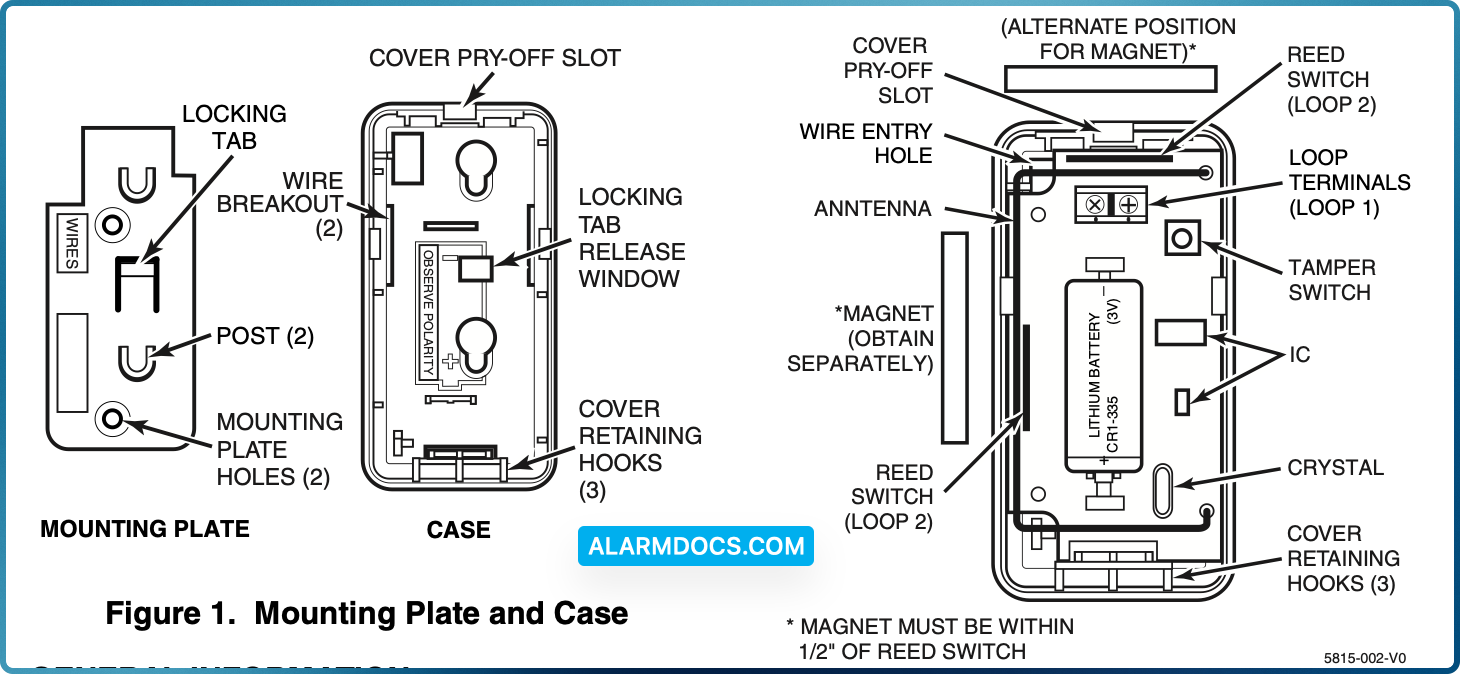
MOUNTING
For proper orientation of the unit in relation to the mounting plate, loop wiring, and/or magnet, read all of this section before installing the unit.
The description that follows assumes that the unit will be mounted as shown in the diagrams, with the magnet (if used) located in one of the positions shown in Figure 1. The unit may, however, be installed in any direction, as long as the relationship of the unit to its mounting plate and (if used) magnet is maintained.
Although the unit can be mounted directly to a surface, we recommend that the mounting plate be used, for ease in removing the unit for servicing should it become necessary.
Before mounting the transmitter permanently, conduct Go/No Go tests (see control’s instructions) to verify adequate signal strength and reorient or relocate the transmitter if necessary.
1. Remove the transmitter’s top cover by inserting the flat blade of a small screwdriver into the pry-off slot at one end of the unit (see Fig. 1 for location), and slightly twisting the blade until the cover disengages.
2. Disengage the attached mounting plate from the case by inserting the blade of a small screwdriver into the locking tab release window (see Figure 1) and pressing it against the locking tab (also shown in Figure 1), while sliding the mounting plate upward along the case back until free.
3. Install the mounting plate, with its two case- holding posts pointing up (in this example), in the location selected as described in the control panel’s installation instructions. Use the flat-head screws supplied.
4. If a wired contact loop is to be used, feed concealed wiring through the slot in the case back, but do not connect to the terminal block yet. For surface wiring entry, two thin “breakout” areas are provided in the case wall (see Figure 1).
5. Attach the case back to the mounting plate by sliding the keyhole slots in the case back down onto the mounting plate’s case holding posts. The locking tab will click as the case back locks in place.
6. If a reed switch is to be used, mount a No. 5899 Magnet (obtained separately) adjacent to the reed switch, or adjacent to the top of the case (see Figure 2). In either case, the magnet must be mounted within one-half inch of the reed switch.
LOOP WIRING CONNECTIONS (If used) With the battery still not inserted, connect the contact loop wires to the unit’s loop terminals (see Figure 1).
The contact loop must use closed-circuit devices. The loop response time is a nominal 100mSec.