Alarm Docs
  • Submit Article
  • Contact Us
  • About Us
  1. Home
  2. Qolsys
  3. Qolsys: Loaning a keypad
Searching...

Other Articles

  • IQ INSTALLER
  • DMP: 860 relay module
  • 711: Zone Expansion Module
  • GEMC-EZM8 – Installation Instructions
  • PG-WLSHW: Wiring a fire zone
  • EVD-2 wiring with 2 additional EVD-R
  • Vista: How to enable Contact ID
  • DMP: How to program static IP
  • ADC: Internet connection type compatibility
  • StarLink SLE-LTE: Wiring diagram
  • StarLink SLE-LTE: Terminal Descriptions
  • PowerSeries Neo: Change entry delay
  • Vista: How to program house code
  • How to address 6160 keypad on Vista 21
  • 1100DH: Installation Guide
  • OPTEX Beams: Master/slave selector switch setting
  • Lynx: Summary of connections
  • PROTAKEOVER: Setup guide
  • PGP922: Installation Guide
  • Qolsys IQ4: How to disable the panel camera
  • Qolsys IQ4: How to disable the panel tamper
  • Qolsys IQ4: How to enable wellness page
  • Qolsys IQ4: Wellness page
  • PGPx303: Installation guide
  • XF6: Terminals 17-28

Qolsys: Loaning a keypad

If a keypad is assigned to one partition, a user can still access other partitions by loaning the keypad.

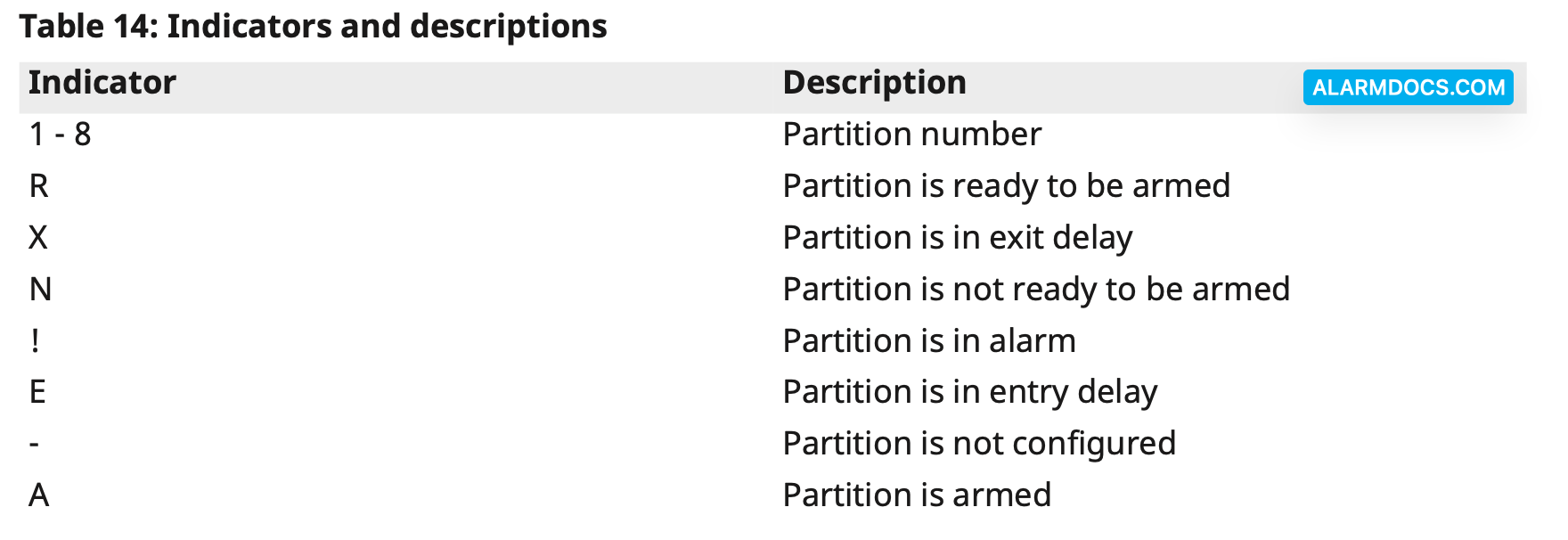
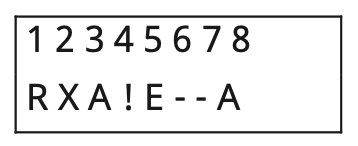
Press and hold the # button for 2 seconds to display the status of all eight partitions.

The user can select a partition and enter the correct code to access it. If no partition is selected from the Global screen, the keypad reverts to its assigned partition in several seconds.

Partitions display
Tagged: loaningpartitions
Was this article helpful?
Yes No
© Copyright 2026 - AlarmDocs.Com