Alarm Docs
  • Submit Article
  • Contact Us
  • About Us
  1. Home
  2. DMP
  3. DMP: Common Keypad Displays
Searching...

Other Articles

  • DMP XF6: Accessory devices
  • Reset Alula radio/communicator
  • How to add a zone to a VISTA H3
  • DMP XF6: Programming requirements
  • DMP XF6: Compatibility
  • DMP XF6: Wire the panel
  • DMP XF6: Install the panel
  • DMP XF6: Specifications Summary
  • XF6: Operating Instructions
  • Radionics: D168 Module Installation
  • PROA7PLUS: Re-register the radio
  • Install piezo on Honeywell Vista 21
  • S2000 – How to enter programming
  • DMP: Version 263 Update
  • Qolsys IQ4: Latest firmware version
  • Napco GEM-P1632: Error codes
  • Honeywell VISTA-128BPT compatible devices
  • Honeywell Vista 128BPT: ECP Error
  • Updating firmware on an Alula cellular communicator
  • How to update NAPCO StarLink firmware
  • How to adjust thermostat from IQ Panel 5
  • Create a guest code on the Qolsys IQ5
  • Programming VISTA-21iP for internet-only
  • Program user code on DMP XR/XT panel
  • Program the on-board triggers on Vista 21

DMP: Common Keypad Displays

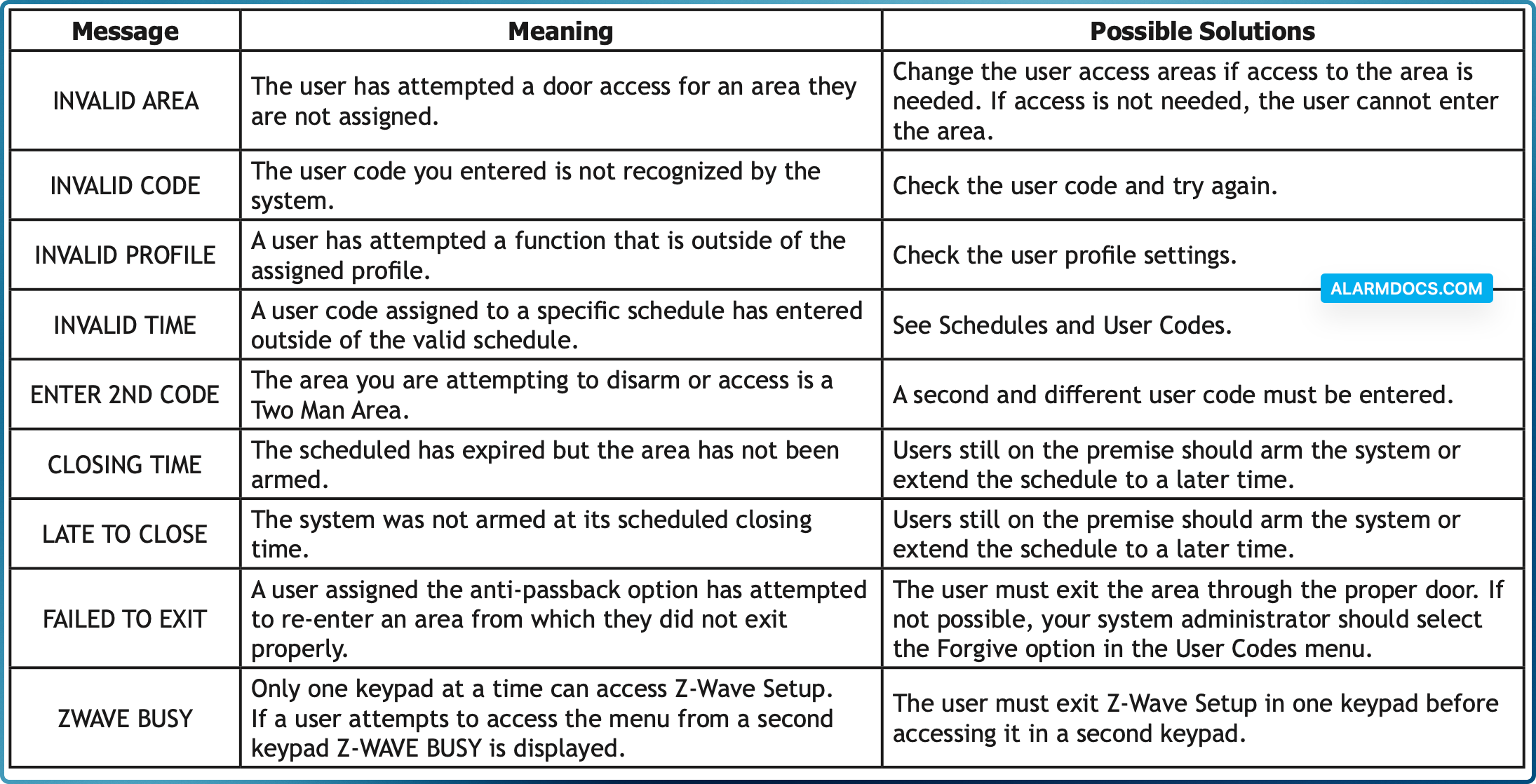
Listed below are several keypad messages you may see on the display. Follow the instructions in the Possible Solutions column to correct the problem. In many cases, you need to call a service person to correct the problem. Displays that are not discussed here mean that your service representative should be called.
Tagged: commondesplayerror
Was this article helpful?
Yes No
© Copyright 2026 - AlarmDocs.Com