
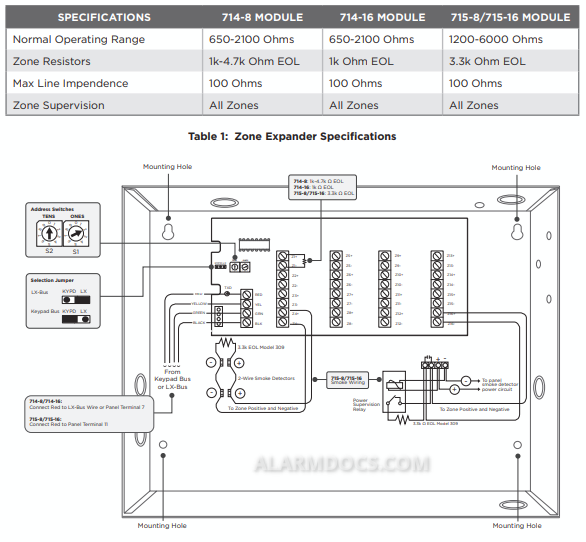
The 714-8 and 714-16 provide an additional eight or sixteen supervised zones for connecting burglary and nonpowered fire alarm initiating devices to the panel.
The 715-8 and 715-16 provide an additional eight or sixteen 12 VDC ungrounded (Class B) powered zones for connecting two-wire smoke detectors.
The zone expanders provide terminal strips, a jumper for LX-Bus or Keypad Bus designation, and a transmit data LED to indicate panel communication.
All fire device installations must be in accordance with the manufacturer instructions, NFPA standards, and Authority Having Jurisdiction (AHJ) requirements.
WIRE THE ZONE EXPANDER
- The zone expanders provide a 3-pin header with jumper used to select the connection type.
- To connect the expander to the Keypad Bus, place the jumper across the two leftmost pins.
- To connect the expander to the LX-Bus, place the jumper across the two rightmost pins. For more information, refer to Figure 1.
Connect to the LX-Bus
To wire the 714-8/714-16, join the red, yellow, green, and black wires to a 4-wire harness and connect it to the LX-Bus.
To wire the 715-8/715-16, connect the red wire to panel Terminal 11 (Smoke power terminal). This allows Sensor Reset to drop power to the module and devices connected to its zones. Join the yellow, green, and black wires to a 4-wire harness and connect it to the LX-Bus.
Connect the 714-8/714-16 to the Keypad Bus
- Connect the red, yellow, green, and black wires to panel Terminals 7, 8, 9, and 10 respectively.
- Observe polarity and wire the zones. 3. For 714-8 expanders with hardware Level E or higher, the expander will read any resistor from 1k-4.7k Ohms without additional programming.
- For 714-8 expanders with hardware Level D or lower and 714-16 expanders, install the included 1K Ohm EOL resistors.
Connect the 715-8/715-16 to the Keypad Bus
- Connect the red wire to panel Terminal 11 (Smoke power terminal). This allows Sensor Reset to drop power to the module and devices connected to its zones. Alternately, connect red to a regulated, power limited power supply listed for Fire Protective Signaling through a Model 716 relay. Use the Sensor Reset Output programming to drop power to the expander.
- Connect the yellow, green, and black wires to panel Terminals 8, 9, and 10 respectively.
- Observe polarity and wire the zones
- Install the included 3.3K Ohm EOL resistors.
SET THE ZONE EXPANDER ADDRESS
714-8/16 and 715-8/16 Point Zone Expanders use two rotary switches (TENS and ONES) to set the zone expander address.
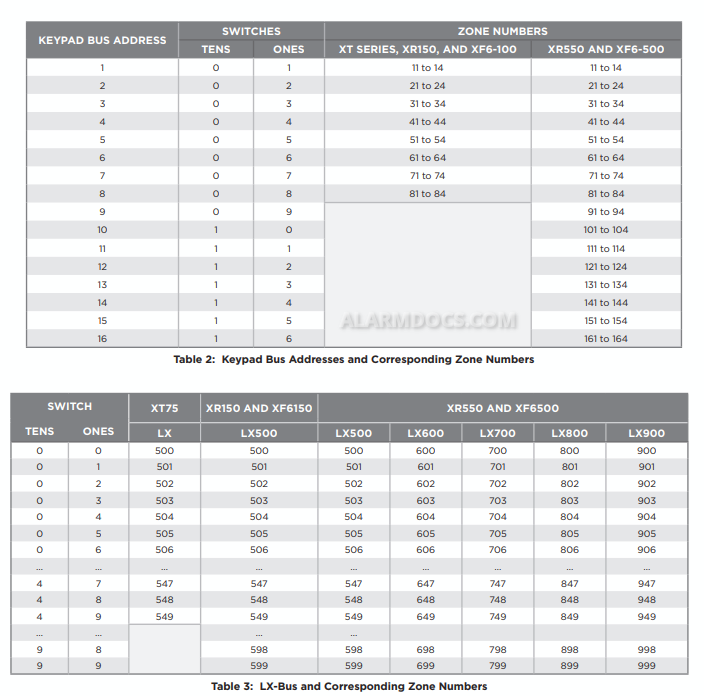
For keypad bus addresses, the ONES switch must be set to a starting address that communicates the status of the first four zones (Z1 through Z4) on the expansion module. The next consecutive keypad address is automatically used to communicate the status of the next four zones (Z5 through Z8), etc. For example, when you set the TENS switch to 0 and the ONES switch to 2, the first four expander zones respond as zones 21 through 24. Expander zones 5 through 8 respond as panel zones 31 through 34, zones 9 through 12 respond as panel zones 41 through 44, and zones 13 through 16 respond as panel zones 51 through 54. Refer to Table 2.
For LX-Bus addresses, set the switches to match the second two digits of the first panel zone being used. The next 15 zone addresses communicate the status of the expander zones 2 through 16. For example, if you set the TENS switch to 3 and the ONES switch to 2, the sixteen zones on the expander respond as panel zones 532 to 547 when connected to LX500. When connected to LX600, the zones respond as 632 to 647. Refer to Table 3.
ADDITIONAL INFORMATION
DMP recommends using 18 or 22 AWG for all LX-Bus and Keypad Bus connections. The maximum wire distance between any module and the DMP Keypad Bus or LX-Bus circuit is 1,000 feet. To increase the wiring distance, install an auxiliary power supply, such as a DMP Model 505-12 or a DMP PS12-5. Maximum voltage drop between a panel or auxiliary power supply and any device is 2.0 VDC. If the voltage at any device is less than the required level, add an auxiliary power supply at the end of the circuit.
LED Operation
The LED on the zone expanders flashes each time the zone expander responds to a poll from the panel. If there is a problem with the hardware, panel programming, or the green data wire between the panel and the zone expander, the LED stops flashing and System Trouble appears in the keypad display.
Download the installation guide directly from DMP website: https://assets.dmp.com/assets/LT-0401.pdf