Alarm Docs
  • Submit Article
  • Contact Us
  • About Us
  1. Home
  2. Access Systems
  3. DXR-702: Checking memory
Searching...

Other Articles

  • IQ INSTALLER
  • DMP: 860 relay module
  • 711: Zone Expansion Module
  • GEMC-EZM8 – Installation Instructions
  • PG-WLSHW: Wiring a fire zone
  • EVD-2 wiring with 2 additional EVD-R
  • Vista: How to enable Contact ID
  • DMP: How to program static IP
  • ADC: Internet connection type compatibility
  • StarLink SLE-LTE: Wiring diagram
  • StarLink SLE-LTE: Terminal Descriptions
  • PowerSeries Neo: Change entry delay
  • Vista: How to program house code
  • How to address 6160 keypad on Vista 21
  • 1100DH: Installation Guide
  • OPTEX Beams: Master/slave selector switch setting
  • Lynx: Summary of connections
  • PROTAKEOVER: Setup guide
  • PGP922: Installation Guide
  • Qolsys IQ4: How to disable the panel camera
  • Qolsys IQ4: How to disable the panel tamper
  • Qolsys IQ4: How to enable wellness page
  • Qolsys IQ4: Wellness page
  • PGPx303: Installation guide
  • XF6: Terminals 17-28

DXR-702: Checking memory

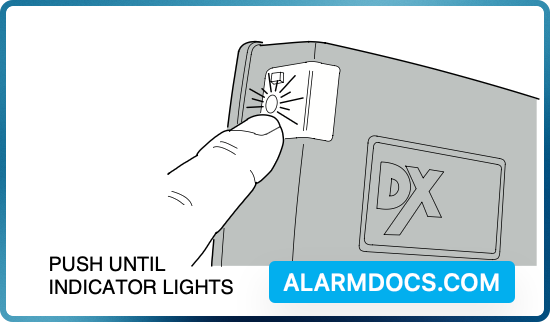
  1. PRESS PROGRAM BUTTON FOR THE DESIRED CHANNEL AND HOLD FOR ABOUT TWO SECONDS UNTIL INDICATOR LIGHTS THEN RELEASE.
  1. COUNT THE NUMBER OF INDICATOR BLINKS, THIS IS THE TOTAL NUMBER OF TRANSMITTERS PROGRAMMED INTO THAT CHANNEL.

NOTE: DO NOT CONTINUE TO PRESS BUTTON OR MEMORY WILL BE ERASED.

Tagged: dxr702dxr-702
Was this article helpful?
Yes No
© Copyright 2026 - AlarmDocs.Com